eNotarization for HR: Quitclaims, Affidavits, and Employment Documents

eNotarization lets HR teams in the Philippines have quitclaims, affidavits, and other employee documents notarized online, with the employee joining from wherever they are in the country.
Picture the last week of a resignation. The employee has moved home to Iloilo, final pay is ready in Pasig, and the release, waiver, and quitclaim still needs a notary. Under the old routine, somebody travels. Either the employee flies back to sign in front of a notary near the office, or the document goes out by courier to a notary near them and comes back the same way, days later.
With electronic notarization, the same document can be notarized in one remote session, with the employee at home in Iloilo, an HR officer in Pasig, and a commissioned Electronic Notary Public (ENP) practicing anywhere in the Philippines. Twala, one of the first three Electronic Notarization Facilities (ENFs) the Court accredited, runs that session in the browser.
Most HR paperwork never needed a notary
Start by separating the documents that need a notary from the ones that don’t. Job offers, employment contracts, and policy acknowledgments are valid without notarization, and under the Electronic Commerce Act (R.A. 8792) an electronic signature on them carries legal weight. They can go out as an eSignature envelope and be filed the same day. Our guide to eSignature, digital signature, and eNotarization explains where the line falls.
The documents HR teams usually do send to a notary make a shorter list:
- The release, waiver, and quitclaim signed at separation
- Affidavits employees execute, such as an affidavit of loss for a company ID or a payroll card
- Authorization letters and special powers of attorney, for example when a relative claims final pay on an employee’s behalf
- Loan agreements for salary or emergency loans
- Training, scholarship, and service agreements the company wants in a public document
Each of these fits a document type an ENP can notarize on Twala: quitclaims and waivers, affidavits, authorization letters, powers of attorney, loan or credit agreements, contracts, and service agreements.
A word about quitclaims
Notarization changes how a quitclaim can be proved. It doesn’t change whether the quitclaim is fair.
Philippine labor law looks hard at waivers signed by employees. When one is challenged, the questions are whether the employee signed it voluntarily and without fraud, whether the consideration was credible and reasonable, and whether the waiver goes against law or public policy. A notarial seal answers none of them. A quitclaim that shortchanges an employee doesn’t become valid because an ENP notarized it, online or on paper.
What eNotarization adds is a clean record of how the document was executed. The employee’s identity is verified with their ID and a face scan before the session. The ENP sees them live, confirms they understand the document and are signing it freely, and performs the act. The Rules treat that videoconference as the equivalent of appearing in person, and pre-recorded videos of signing are prohibited. If the notary asks to record the session and everyone consents, there is a recording as well. Afterward, the PDF is sealed so that any later change shows when it’s verified.
So give the employee time with the document before the session, and room to ask questions on the appointment’s Messages tab. When a quitclaim goes out in an envelope, the employee can have Twala explain it before signing, with flags to review, a summary, and key points. That helps them read it. It isn’t legal advice, and neither is anything else Twala provides.
How it works for an HR team
- Draft. Start from the HR templates in Twala’s template gallery, or upload your own PDF. Ask Lex to adjust a draft from your workspace files; it proposes edits, and they go in only when you click Apply. If a document was prepared or signed in another tool, upload the PDF and have it signed on Twala.
- Verify identities. Everyone who will appear before the notary needs a free Twala account and a current identity verification: a Philippine National ID checked against the national registry, or another government-issued ID, followed by a face scan. It stays current until the ID expires or for three years, whichever comes first. Our Get notarized page is a good link to send employees.
- Book the notarization. The employee or the company’s signatory requests an appointment, picks an ENP and one of their open times, and adds everyone who will appear, as principals or witnesses.
- Sign at the right moment. For an acknowledgment, the company signatory and the employee can sign through an envelope before the session and confirm their signatures to the ENP. Affidavits are sworn to in a jurat, and the Rules have the affiant sign as part of the act, so ask the ENP on the Messages tab when to sign.
- Appear. Everyone joins the remote session from their own device. The ENP confirms each person’s details, performs the act, and requests payment, which is due within 24 hours.
- File it. Once the fee is paid, the notarized PDF appears under Notarizations with its certificate page, seal, and QR code. Save it to the employee’s file in an HR workspace.
The full walkthrough, screen by screen, is in how to notarize a document online.
When you have many employees
Be realistic about volume. Each notarial act needs its principals to appear, so a round of fifty separations still means fifty appearances. What gets lighter is everything around them. Employees verify once and stay verified for up to three years. Reusable signing templates keep the fields and roles in place. And sessions no longer depend on geography, because an ENP’s authority covers the whole country: a BPO with sites in Bacolod and Davao, or a retailer with store staff across Luzon, can work with ENPs wherever they practice.
The limit is the border. Employees working overseas can’t join a session on Twala from abroad, because everyone in a session has to be in the Philippines. Our guide for OFWs and Filipinos abroad sets out their options.
Keeping employee files private
HR holds some of the most sensitive documents in a company. On Twala, team workspaces are private until shared, and each teammate gets no access, view access, or edit access, item by item. Owners and admins decide who on the team can use notary features at all. On a notarization, witnesses see its status and register details but never the document itself.
Identity verification collects nothing until the person ticks the consent box, and Twala handles personal data under the Data Privacy Act of 2012 (R.A. 10173), with a Privacy Manual and a Data Protection Officer. If you use Lex on HR files, AI search is switched on file by file, Lex answers only from files the person asking can open, and no user data is ever used to train the AI.
After the notary: storage, search, and reports
A notarized quitclaim sitting in someone’s inbox is hard to produce when an auditor or a labor case asks for it. Keep notarized PDFs in an HR workspace, where they keep their version history, and find them again with ⌘K search, which looks up notarizations, envelopes, and files by name. Once Lex has read a file, Smart tags suggests labels for it.
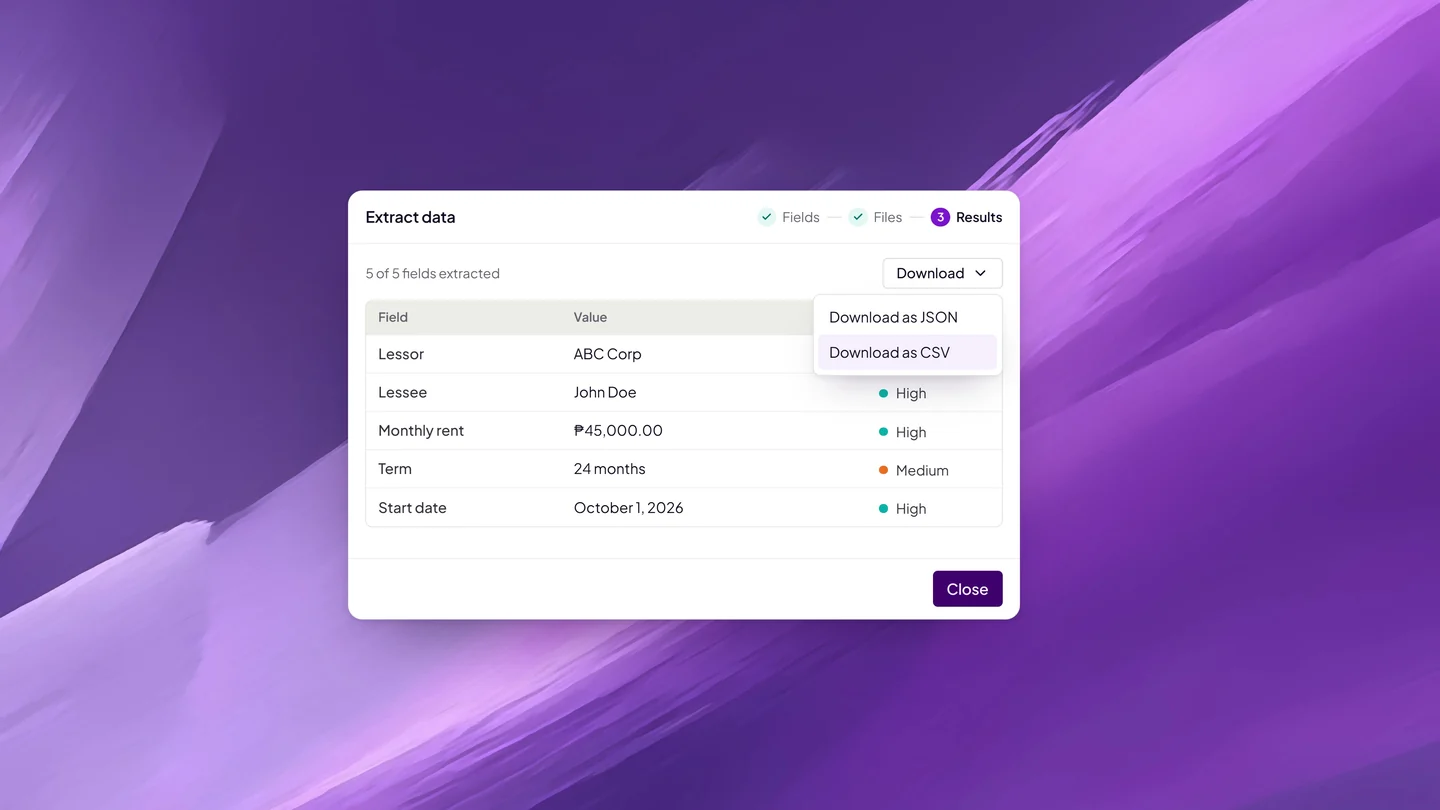
Data extraction pulls the fields you name, such as an employee’s separation date and the amounts in a release, into a CSV for payroll, with a confidence level on each value. Reports on files, envelopes, and board tasks export as CSV or PDF. Task boards keep onboarding and offboarding checklists next to the documents, with an assignee and a due date on each task.
For team setup and company-wide policy, read eNotarization for businesses. How to get an affidavit notarized online covers jurats and oaths for the affidavits employees bring you, and the complete guide to eNotarization in the Philippines covers the rules.
To try it with your team, create a free Twala account or talk to us about a team plan.
Twala is a Supreme Court-accredited Electronic Notarization Facility (ENF). Twala is a technology provider and does not give legal advice. Notarial acts are performed by commissioned Electronic Notaries Public.