How to Notarize a Document Online in the Philippines, Step by Step

You can get a document notarized online in the Philippines today, through an Electronic Notary Public and a Supreme Court-accredited platform. Here is the whole process on Twala, from a new account to a notarized PDF.
Under the Supreme Court’s Rules on Electronic Notarization, a lawyer commissioned as an Electronic Notary Public (ENP) can notarize an electronic document for someone in another city or province. The only conditions on location are that everyone is in the Philippines and that the act runs through an accredited Electronic Notarization Facility (ENF). Twala is one of the first three ENFs the Court accredited.
The steps below follow Twala’s own screens, button for button.
Before you start
Have these ready. If one of them is missing on the day, the notary may have to move your session.
- Your Philippine National ID, or another government-issued ID that hasn’t expired and shows your photo clearly
- The document as a PDF, final and complete, with no blanks left to fill in later
- A phone or computer with a working camera and microphone, in a current version of Chrome, Edge, Safari, or Firefox
- An internet connection of at least 2 Mbps
- The names and email addresses of everyone else who has to sign or appear, such as a co-owner or your witnesses
- Proof of authority if you’re signing for a company or for someone else: a board resolution, a secretary’s certificate, or a special power of attorney
Everyone in the session, the notary included, has to be in the Philippines. Our online notarization requirements checklist goes through each item in more detail.
Step 1: Create a free Twala account
Go to platform.twala.ai and sign up with Google, Microsoft, or a one-time code sent to your email. The account costs nothing, and signing documents on Twala is always free. You can also turn on two-factor authentication, so a stolen password alone can’t open your account.
Step 2: Verify your identity once
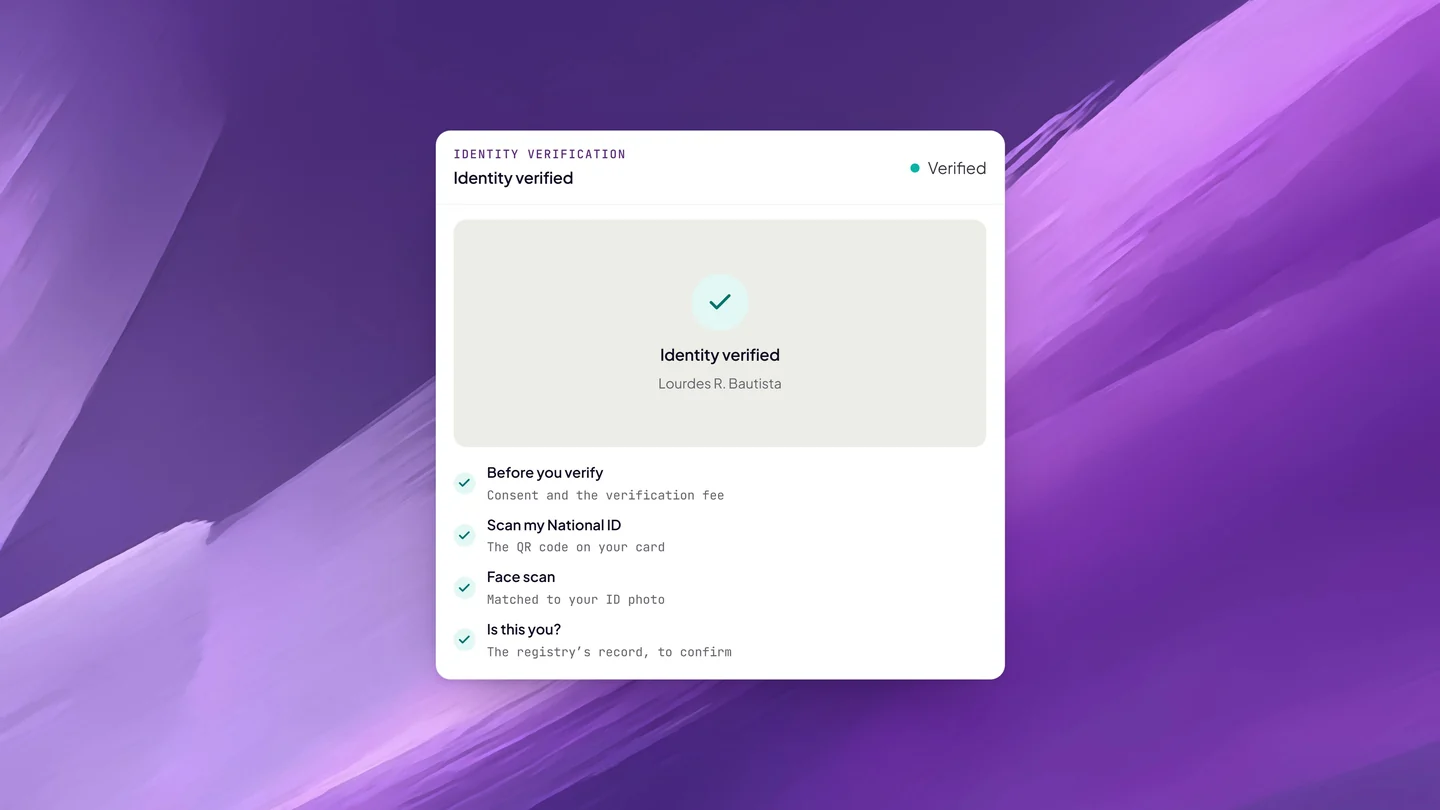
Twala asks you to verify your identity before you can request an appointment, and the notary can’t perform the act until everyone appearing has done the same. You have two ways to do it:
- Philippine National ID. Scan the QR code on your card, and Twala checks it against the national registry.
- Another government-issued ID. Take a clear photo of an ID that hasn’t expired.
Either way, you finish with a face scan, which is matched to the photo on your ID. Nothing is collected until you tick the consent box, and the verification fee is shown before you start.
You only do this once. A verification stays current until the ID you used expires or for three years, whichever comes first, so your next notarization skips this step entirely. Our explainer on identity verification in online notarization covers what is checked and who can see it.
Step 3: Get the document signed on Twala
An electronic notarization on Twala takes a document signed with Twala’s secure digital signature. Under the Supreme Court’s rules, only secure electronic signatures and digital signatures qualify for notarization, so pasting a scanned signature into the PDF won’t work.
When you sign depends on the notarial act:
- Acknowledgments, the usual act for contracts, deeds, and powers of attorney. You can sign before the session: send the PDF through an envelope, let everyone sign, and pick the completed document when you book. At the session, you confirm to the notary that the signature is yours.
- Jurats, for affidavits you swear to, and signature witnessing. The Rules on Electronic Notarization have you sign as part of the act itself (for signature witnessing, in the notary’s full view). Book first with the unsigned PDF, send the envelope, and ask your notary on the appointment’s Messages tab when to sign.
Either way, the document is notarized only once everyone on it has signed. Nobody pays to sign, and if your document has lines for witnesses (“Signed in the presence of”), they sign it on Twala as well.
Step 4: Request an appointment
In Twala, open Appointments, click Request appointment, and choose Notarization. Then:
- Add the document: a completed one already signed on Twala, or a new PDF nobody has signed yet.
- Give it a name and pick its type, such as an affidavit, a contract, or a power of attorney.
- Choose Remote to appear over live video, or In-person to meet the notary face to face.
- Pick an ENP by name or by city, then one of their open times. Times are shown in Philippine time.
- Add the people who will appear, as principals or witnesses, and send the request.
Requesting is free. The notary accepts or declines, and from the moment you send the request, everyone on the appointment shares a Messages tab for questions, logistics, and files. Messages don’t trigger an email, so watch for the red dot. If something comes up, Change time lets you propose a new slot until the notary’s minimum notice.
Unsure which mode fits? Our comparison of in-person and remote electronic notarization explains when each one makes sense.
Step 5: Join the session
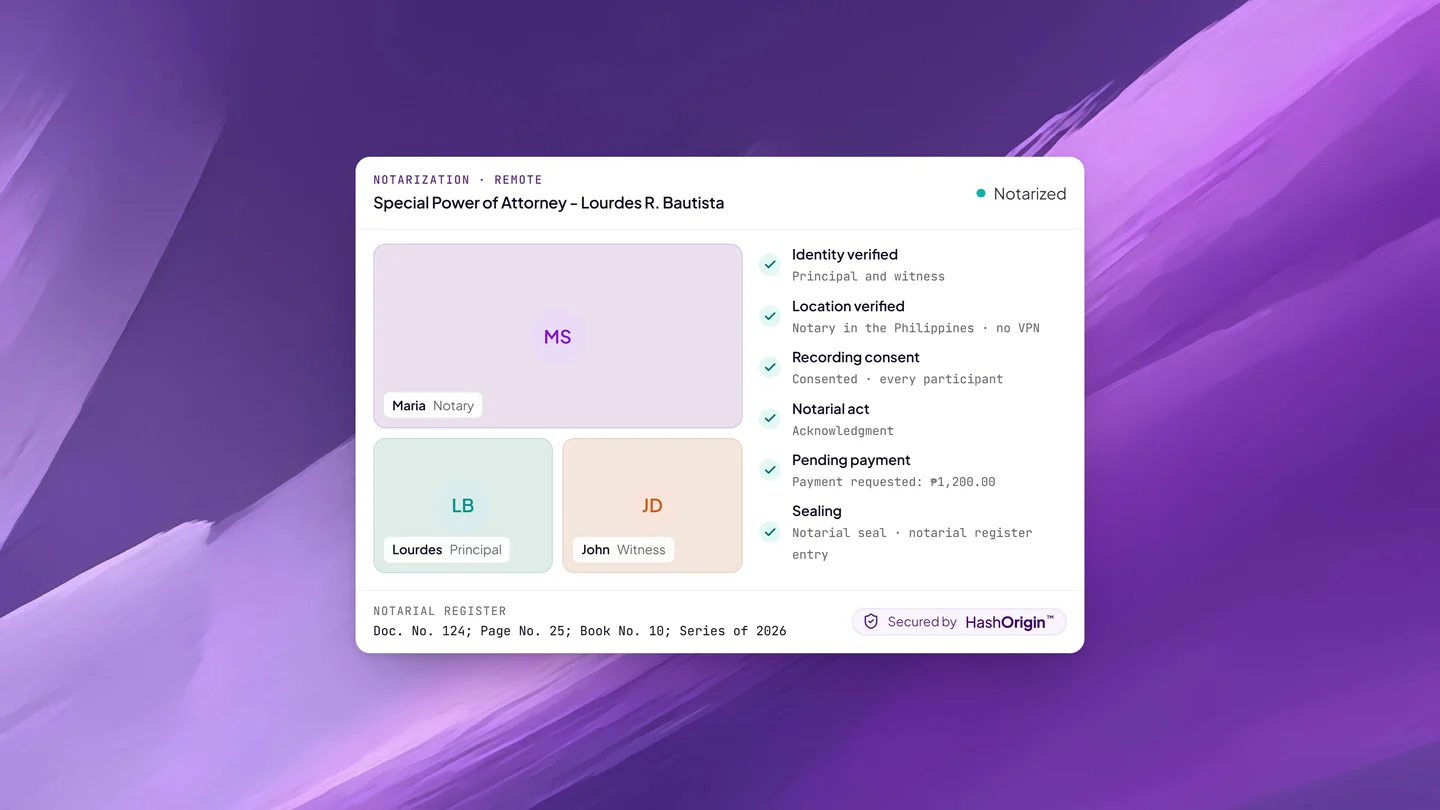
At the scheduled time, open the appointment and click Join session. Turn off any VPN, proxy, or Tor first: Twala checks your location as you join, because the Rules require everyone to be in the Philippines. Click Continue, allow your camera and microphone, and you’re in the call with the notary and everyone else appearing.
The notary confirms each person’s details, makes sure you understand the document and are signing it freely, and performs the notarial act. For a contract or a deed that is usually an acknowledgment; for an affidavit you swear to, a jurat. The notary may ask to record the session. Nothing is recorded unless everyone in the session consents, and if anyone declines, the session simply goes on without a recording.
Stay in the call until the notary tells you the session is finished. If your connection drops, open the same link again. We walk through the call itself, minute by minute, in what happens during a remote notarization session.
For an in-person appointment, the notary arranges where to meet. Everything else works the same way.
Step 6: Pay the notarial fee
After the act, the notary requests payment, and it’s due within 24 hours. Paid online with Pay, it comes to the notarial fee the notary set, plus 12% VAT added at checkout, plus documentary stamp tax. Your notary may instead choose cash payment, made to them directly. The full breakdown is in how much online notarization costs in the Philippines.
Step 7: Download your notarized PDF
Once the fee is paid, Twala adds the notarial certificate page with the notary’s seal and a QR code, enters the act in the notary’s notarial register, and files it with the Supreme Court. Your notarized PDF is then ready under Notarizations, and you can download it again whenever you need it.
The file is a PDF/A-2b sealed with a digital signature and anchored on a blockchain with HashOrigin™ technology. Anyone you send it to can check it on Twala’s verify page; if anything in it has changed since notarization, it shows as Document tampered. Send the PDF itself, not a printout, so the people receiving it can verify it.
Frequently asked questions
Is a document notarized online legally valid?
Yes. Under the Supreme Court’s Rules on Electronic Notarization (A.M. No. 24-10-14-SC), an electronic notarial act performed through an accredited facility has the same validity, force, and effect as a traditional one.
Can I get a document notarized online from abroad?
Not on Twala today. Everyone in a remote session, the ENP included, has to be in the Philippines. Our guide for OFWs and Filipinos abroad sets out what the Rules allow and the options open to you.
Do my witnesses need Twala accounts?
Yes. Each witness needs a free Twala account under the email address you added them with, plus a current identity verification. Send them our guide for witnesses.
Can I do this at night or on a weekend?
Twala is open 24/7, so you can verify your ID, sign, and send a request at any hour. The session itself takes place in one of your notary’s open times. More on that in online notarization 24/7.
Which documents can I notarize this way?
Affidavits, contracts, deeds, powers of attorney, lease agreements, and many more. Notarial wills and depositions are not covered. See which documents can be eNotarized.
Ready when you are: create a free Twala account, or read Get notarized for more detail on each screen. For the bigger picture, start with our complete guide to eNotarization in the Philippines.
Twala is a Supreme Court-accredited Electronic Notarization Facility (ENF). Twala is a technology provider and does not give legal advice. Notarial acts are performed by commissioned Electronic Notaries Public.