What Happens During a Remote Notarization Session

A remote notarization session is a live video call in which an Electronic Notary Public confirms who you are, that you understand the document, and that you’re signing freely, then performs the notarial act.
If you have never done one, the idea of being notarized over video can feel strange. In practice it looks a lot like a meeting you’d join for work, with a few checks that a regular call doesn’t have. Here is what to expect on Twala, from the night before to the moment your notarized PDF is ready.
The day before
A smooth session starts the day before. Open your appointment and look at three things.
First, the signatures. A remote electronic notarization (REN) on Twala takes a document signed with Twala’s secure digital signature, and when you sign depends on the notarial act. For an acknowledgment, the usual act for contracts, deeds, and powers of attorney, everyone can sign through the envelope before the session, and you confirm your signature to the notary on the call. For an affidavit, which takes a jurat, or for signature witnessing, the Rules on Electronic Notarization make signing part of the act itself, so ask your notary when to sign.
Second, the people. Every principal and every witness needs a current identity verification, and the notary can’t perform the act until all of them have one. If your witness hasn’t verified yet, now is the time to remind them.
Third, the Messages tab. Everyone on the appointment shares it, the notary included. Use it to confirm details, settle when to sign, ask what the notary will need, or send a file such as a board resolution if you’ll be signing for a company. Messages don’t send an email, so check for the red dot.
Then sort out the practical side: a phone or computer with a working camera and microphone, a current browser (Chrome, Edge, Safari, or Firefox), a connection of at least 2 Mbps, and a quiet, private room. A parked car with weak signal or a busy coffee shop is not the place.
Joining the session
At the scheduled time, open the appointment and click Join session.
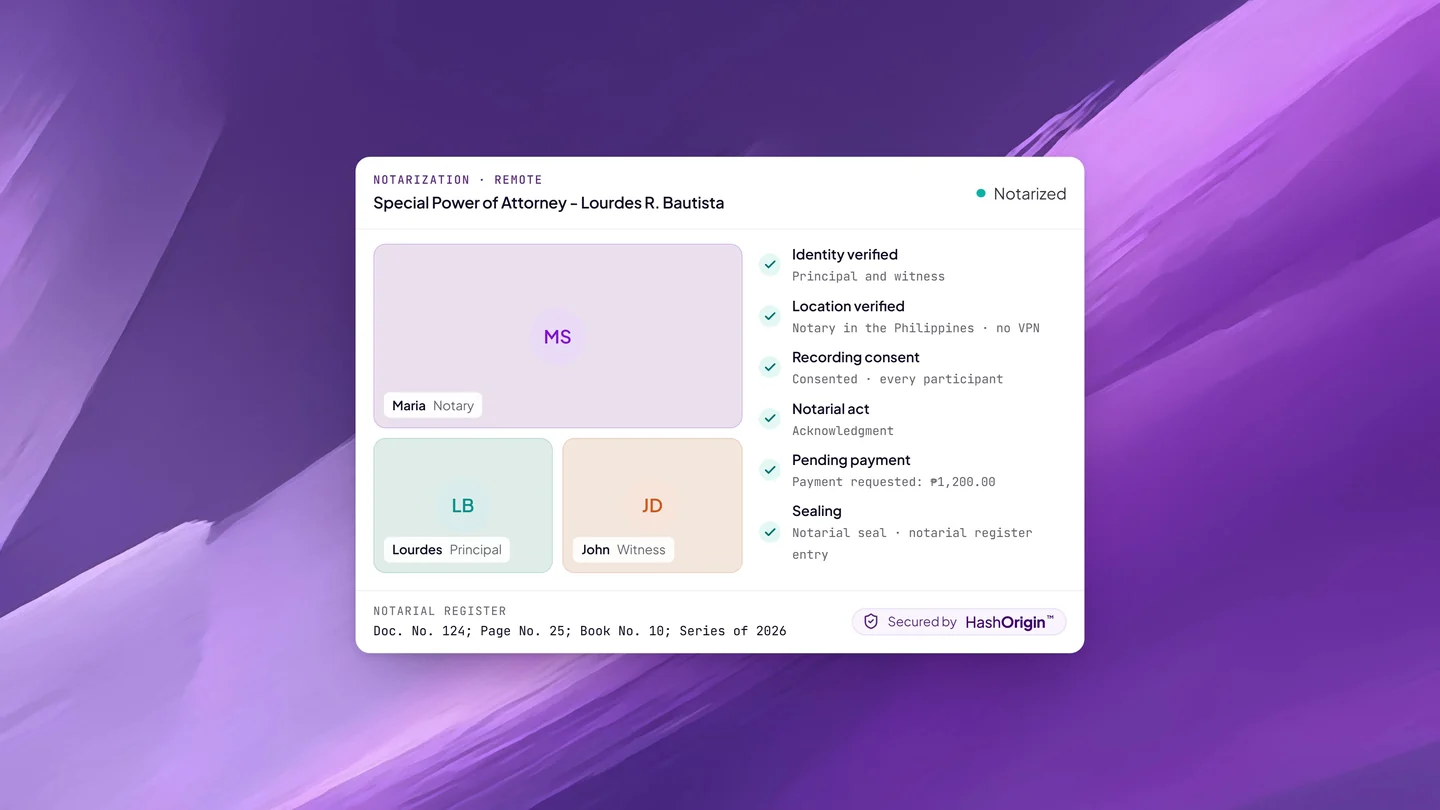
Twala first asks you to turn off any VPN, proxy, or Tor. Click Continue and your location is checked, because the Rules on Electronic Notarization require everyone in a remote session, the Electronic Notary Public (ENP) included, to be in the Philippines. Sharing your device’s location is optional. The connection check is not.
Next, allow your camera and microphone, and you’re in the call. Everyone appears from their own device: you might be at home in Batangas, your co-signer at the office in Ortigas, and the notary in Cebu. Under the Rules, appearing by videoconference counts as appearing in person, provided it is live. Pre-recorded videos of principals or witnesses signing are strictly prohibited. Stay until the notary tells you the session is finished.
What the notary does
The notary’s job in a remote session is the same as across a desk: to be satisfied that the right people are signing the right document, knowingly and voluntarily. Identity verification was done before you booked, but the notary still confirms each person’s details on the call. Expect questions along these lines:
- Please state your full name.
- Is this the document you’re notarizing, and is that your signature?
- Do you understand what the document says and what it does?
- Are you signing of your own free will?
- If you’re signing for a company or another person, what authority do you have to do so?
Answer plainly. If you don’t understand part of the document, say so; a notary who isn’t satisfied can decline to perform the act, and that is the system working as it should.
The notary may also ask to record the session. The Rules allow it but don’t require it. On Twala, nothing is recorded unless everyone in the session consents, and if anyone declines, the session continues without a recording. When a session is recorded, only the notary can open the recording.
Then comes the act itself. For a contract, a deed, or a special power of attorney, it is usually an acknowledgment: you declare that the signature is yours and that you signed freely. For an affidavit, it is usually a jurat, in which the notary has you sign and take an oath or affirmation that what the document says is true. Our list of documents you can eNotarize explains all five notarial acts.
Payment, then the seal
After the act, the notary requests payment. You have 24 hours to pay. Online, you click Pay, and the total is the notarial fee the notary set, plus 12% VAT added at checkout, plus documentary stamp tax. Your notary may instead choose cash payment, made to them directly. Our guide to what online notarization costs breaks this down.
Once the fee is paid, Twala finishes the job. It adds the notarial certificate page with the notary’s seal and a QR code, enters the act in the notary’s notarial register, and files it with the Supreme Court. Your notarized PDF appears under Notarizations, ready to download. What you’re holding, and why you should share it as a PDF rather than a printout, is explained in your eNotarized PDF, explained.
The Messages tab stays open until 24 hours after the session is completed, in case anyone has a last question.
If something goes wrong
Your connection drops. Open the same link again and rejoin. If the session has already ended, the notary can start a new one, and you’ll be told by email and in Twala.
Twala won’t let you continue. Look for a VPN, proxy, or Tor connection, including a VPN that your office laptop turns on by itself. Switch it off and try again.
Your camera or microphone doesn’t work. Check that your browser has permission to use them, and close other apps that might be holding them, such as another video call.
Someone can’t make it. The notary can only act for the people who appear. Message everyone on the appointment as early as you can, and use Change time to propose another slot while it’s still available.
If you’re there as a witness
Witnesses join the same way and go through the same location check. You stay in the call while the notary confirms everyone’s details and performs the act. You won’t see the document in Twala; your name, address, and ID details are entered in the notary’s notarial register, as the Rules require. If you need a copy later, you can request one. Our guide for witnesses covers the rest.
And if it’s in person
For an in-person electronic notarization (IEN), the notary arranges where to meet, and you sit across the table instead of across a screen. The identity checks, the questions, the act, the payment, and the sealing all work the same way. Our comparison of IEN and REN helps you choose.
Ready to book one? Our step-by-step guide covers everything before the session, the requirements checklist makes sure nothing is missing, and the complete guide to eNotarization in the Philippines answers the bigger questions. Then get notarized on Twala.
Twala is a Supreme Court-accredited Electronic Notarization Facility (ENF). Twala is a technology provider and does not give legal advice. Notarial acts are performed by commissioned Electronic Notaries Public.