Online Notarization Requirements in the Philippines: Your Checklist
Online notarization requirements in the Philippines come down to a short list: a verified ID, your document on Twala, a working camera and connection, a location inside the country, and the right people present.
None of them is hard to meet. Each one, missed, can stop a session, so sort them out the day before rather than five minutes before the call. This checklist follows the Supreme Court’s Rules on Electronic Notarization and the way sessions run on Twala.
1. A verified identity, for everyone who appears
Every principal and every witness verifies their identity on Twala before the act. The notary can add people to an appointment before they verify, but the act can’t be performed until all of them have. The Rules ask for competent evidence of identity, meaning at least one valid government-issued ID, and they require every accredited platform to use multi-factor authentication and liveness detection and to block people whose IDs are expired or invalid.
On Twala you verify with one of these:
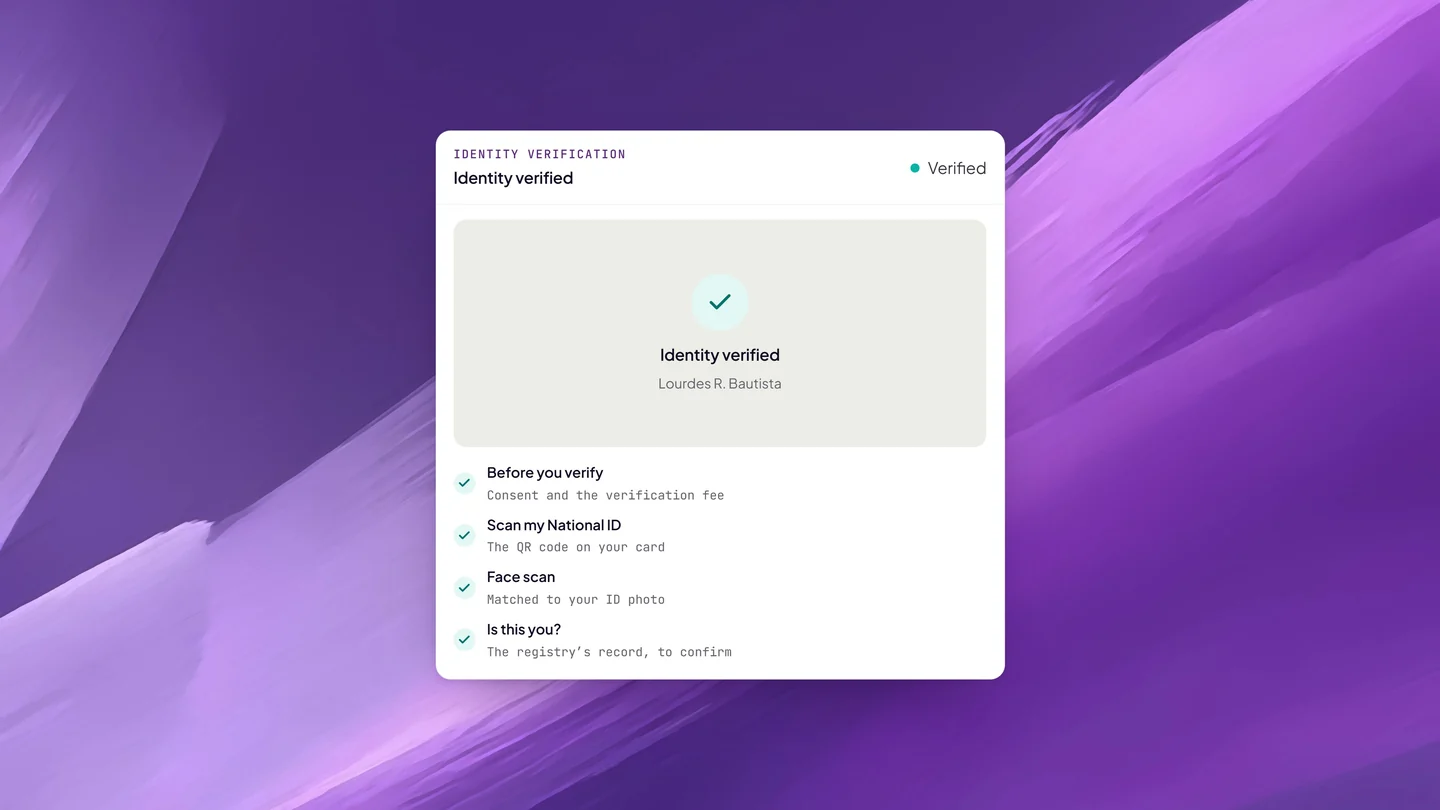
- Your Philippine National ID. Scan the QR code on the card, and Twala checks it against the national registry.
- Another government-issued ID that hasn’t expired and shows your photo clearly. You take a photo of it.
Then comes a face scan, matched to the photo on your ID. The fee is shown before you start, and nothing is collected until you consent. Your verification stays current until the ID expires or for three years, whichever comes first. If the ID you verified with expires before your session, your verification lapses with it, and you verify again with an ID that is still valid. Identity verification in online notarization explains each check.
2. Your document, as a final PDF on Twala
eNotarization works on electronic documents, so bring yours as a PDF: finished, every blank filled in, every page in order. Notarizing blank or incomplete documents is one of the oldest notary scams, so expect your ENP to turn away a document with gaps.
The signatures on it are made on Twala with Twala’s secure digital signature, because the Rules accept only secure electronic signatures and digital signatures for notarization. A scanned signature pasted onto the page won’t do, and neither will a file signed in another tool. Upload the PDF and have it signed on Twala.
When you sign depends on the act:
- Acknowledgments, the usual act for contracts, deeds, and powers of attorney. Everyone can sign on Twala before the session, and you confirm to the notary at the session that the signature is yours.
- Jurats, for affidavits, and signature witnessing. The Rules have you sign as part of the act, so book first with the unsigned PDF and ask your notary on the Messages tab when to sign.
Signing is free for everyone. Notarial wills, depositions, and paper documents that must stay on paper can’t be eNotarized; see which documents can be eNotarized if you’re unsure about yours.
3. A device, a browser, and 2 Mbps
For a remote session, each person appearing needs:
- A phone or computer with a working camera and microphone
- A current version of Chrome, Edge, Safari, or Firefox
- A stable connection of at least 2 Mbps
A phone is fine, in its browser, as long as the camera, microphone, and connection hold up. Below 2 Mbps, the video can freeze or the call can drop. If you’ll be on mobile data somewhere with patchy signal, test it at the same time of day as your booking, because a connection that works at 2 p.m. can crawl at 8 p.m. Earphones help you hear the notary clearly.
4. A location inside the Philippines
The ENP must confirm through geolocation that all parties are in the Philippines. On Twala, each person’s location is checked when they book and again when they join, and VPNs, proxies, and Tor are blocked. Turn off any VPN before you click Join session. Company laptops sometimes run one by default, so check with your IT team the day before. Sharing your device’s location is optional.
The Rules allow one exception, for a principal abroad who appears from inside a Philippine embassy, consular office, or Honorary Consul office, with an officer there confirming their presence and the ENP still in the Philippines. Sessions on Twala require everyone, the notary included, to be in the Philippines. Our guide for OFWs and Filipinos abroad explains what that means for families with someone overseas.
5. Your witnesses, if the document needs them
If your document needs witnesses, each one needs:
- A free Twala account under the same email address you added them with
- A current identity verification
- A location in the Philippines on the day
A witness can be anyone with a valid ID who isn’t a party to the document and doesn’t benefit from it. If the document has a line for them (“Signed in the presence of”), they are a signing witness and sign it on Twala; if not, they simply appear. Send them our guide for witnesses so they know what to expect.
6. Proof of authority, if you sign for someone else
If you sign for a company, a cooperative, or another person, have your proof of authority ready: a board resolution, a secretary’s certificate, or a special power of attorney. The notary may want to see it before performing the act, and you can share it ahead of time as a file on the appointment’s Messages tab. Notarizing secretary’s certificates and board resolutions online covers company signatories in more detail.
7. A quiet room and your full attention
Find a quiet, private place where no one will walk in, with light on your face so the notary can see you clearly. Stay in the call until the notary tells you the session is finished. If the connection drops, open the same link again.
If you’re appearing in person instead
Choosing In-person instead of Remote changes only how you appear. You still verify your identity and use a PDF on Twala, and then you appear physically before the ENP, who arranges where to meet. The location rules apply here as well.
When a session can’t go ahead, and the fix
| Problem | Fix |
|---|---|
| A witness hasn’t verified their identity | Ask them to finish verification before the session. The act can’t be performed without it. |
| Your ID expired after you verified | Verify again with an ID that is still valid. |
| Someone hasn’t signed an acknowledgment document | Follow up through the envelope. The document is notarized only once everyone has signed. |
| The location check fails | Turn off the VPN, proxy, or Tor, then click Continue. |
| The video keeps freezing | Move closer to your router or switch to a connection of at least 2 Mbps, then rejoin with the same link. |
| You’re signing for a company without proof of authority | Share the board resolution or secretary’s certificate on the Messages tab before the session. |
| You can’t make the time | Use Change time on the appointment before the notary’s minimum notice. |
The checklist
The day before
- Everyone appearing has verified their identity on Twala
- Your ID is still valid on the day of the session
- For an acknowledgment, every signer has signed the PDF on Twala; for an affidavit, you know from your notary when to sign
- Witnesses have accounts under the right email addresses and know the time
- Proof of authority is on the Messages tab, if you need it
An hour before
- Phone or laptop charged, camera and microphone working
- Browser updated: Chrome, Edge, Safari, or Firefox
- Connection tested at 2 Mbps or better
- VPN, proxy, and Tor turned off
- A quiet room, with light on your face
Frequently asked questions
Do I need to print anything?
No. Everything happens on the PDF. Avoid printing the notarized document for others too: send them the PDF, so they can verify it.
Do I need a paid Twala plan to get notarized?
No. A free Twala account is enough to verify, sign, and request a notarization.
Which IDs are accepted?
Your Philippine National ID, checked against the national registry, or another government-issued ID that hasn’t expired and shows your photo clearly. Either one is matched to a face scan.
With the checklist done, the rest is quick. Create a free Twala account, then follow how to notarize a document online, step by step. For the rules behind each requirement, see our complete guide to eNotarization in the Philippines and the Get notarized page.
Twala is a Supreme Court-accredited Electronic Notarization Facility (ENF). Twala is a technology provider and does not give legal advice. Notarial acts are performed by commissioned Electronic Notaries Public.