eNotarization in the Philippines: The Complete Guide for 2026

eNotarization in the Philippines lets an Electronic Notary Public notarize a PDF in person or over live video, through a Supreme Court-accredited platform. This guide explains the rules, the steps, and the costs.
For more than a century, a notarized document in this country meant paper. You printed it, signed it in ink, and carried it to a notary’s office, usually somewhere near the city hall, with every other party in tow. That changed on October 19, 2026, when the Supreme Court officially launched electronic notarization and the Philippines’ first two eNotarized documents were signed and notarized on Twala.
This guide is for anyone who needs something notarized: a tenant in Davao, a corporate secretary in Cebu, a family settling an estate across three provinces. It covers what the law allows, how a session works, what it costs, and how to check that an eNotarized document is genuine. Lawyers who want to notarize electronically will find a section of their own near the end.
What eNotarization is
Electronic notarization is a notarial act performed on an electronic document. The document is a PDF, the signatures on it are secure electronic or digital signatures, and the notary is an Electronic Notary Public (ENP): a lawyer the Supreme Court has commissioned to notarize electronically. The act runs through an Electronic Notarization Facility (ENF), a platform the Court has accredited for the purpose.
The notary’s job doesn’t change. An ENP still confirms who is appearing, makes sure each person understands the document and signs it freely, and performs the act: an acknowledgment, an oath, an affirmation, signature witnessing, or a jurat. What changes is the medium. The paper becomes a PDF, the ink becomes a digital signature, the rubber stamp becomes a digital seal, and the notarial register becomes an electronic record that reaches the Supreme Court.
The legal effect stays the same too. Under the Rules on Electronic Notarization, an electronic notarial act carried out through an accredited facility has the same validity, force, and effect as a traditional one. Notarization still turns a private document into a public one, admissible in evidence without further proof of its authenticity, and it still carries a presumption of regularity that only clear and convincing evidence can overturn. As Atty. Third Bagro, Twala’s co-founder and general counsel, wrote in The Last Mile of Digitalization: “Notarization is not an obsolete formality.”
The legal basis, in brief
The idea is older than most people think. The Electronic Commerce Act of 2000 (R.A. 8792) recognized electronic documents and signatures and gave the Supreme Court the option to adopt electronic notarization systems. The Rules on Electronic Evidence (A.M. No. 01-7-01-SC) followed. For two more decades, though, notarization stayed on paper under the 2004 Rules on Notarial Practice, and so did the last step of many otherwise digital transactions.
In 2025 the Supreme Court issued the Rules on Electronic Notarization (A.M. No. 24-10-14-SC), together with guidelines for accrediting ENF providers. The Rules were published on March 9, 2025 and took effect on March 24, 2025. The Court accredited the first three ENF providers on August 5, 2026, opened its portal for ENP applications on August 10, and launched the service to the public on October 19.
Two changes in the Rules matter most to ordinary users. First, an ENP’s notarial jurisdiction is nationwide. A notary based in Legazpi can notarize for a principal in Baguio, something the territorial limits of the 2004 Rules never allowed. Second, appearing before the notary no longer has to mean being in the same room. Under the Rules, appearing by videoconference is the equivalent of appearing physically, with safeguards for identity, location, and recordkeeping built around it.
The new Rules also repealed the pandemic-era Interim Rules on Remote Notarization of Paper Documents (A.M. No. 20-07-04-SC). A notary stamping a paper document after a video call is no longer an option, and an ordinary video call with a lawyer is not eNotarization. Personal data handled along the way is covered by the Data Privacy Act of 2012 (R.A. 10173). For more on the rules themselves, read Is Electronic Notarization Legal in the Philippines?
Two ways to appear: in person or remote
The Rules recognize two modes and allow a mix of the two.
- In-person electronic notarization (IEN). You appear physically before the ENP, but the document is electronic and is signed and sealed digitally. On Twala, the notary arranges where to meet.
- Remote electronic notarization (REN). You appear over live audio and video. On Twala, the session runs in the browser, and everyone named on the notarization joins the same call from their own device.
Remote sessions come with one firm rule on location. The ENP must confirm through geolocation that all parties are in the Philippines, so Twala checks each participant’s location when they book and again when they join, and it blocks VPNs, proxies, and Tor. The Rules make a single exception: a principal abroad may appear from inside a Philippine embassy, consular office, or Honorary Consul office, where a designated officer confirms their presence, while the ENP stays in the Philippines. Our guide for OFWs and Filipinos abroad explains what that means in practice. To choose between the two modes, read IEN vs. REN.
Who does what
The Electronic Notary Public
Only a lawyer commissioned as an ENP can perform an electronic notarial act. A regular notarial commission doesn’t carry over. The lawyer applies to the Supreme Court separately, attends a virtual summary hearing, and shows proof of training on an accredited ENF. An electronic notarial commission runs for two years.
An ENP may work on as many accredited ENFs as they like, with a separate account, notarial book, and seal on each. So if you already have a notary in mind, ask which platform they use, because everyone appearing joins on that platform. On Twala, you can find an ENP by name or by city.
The Electronic Notarization Facility
The ENF is the platform: the identity checks, the video session, the signing and sealing, the notarial register, and the link to the Court. Without the Supreme Court’s accreditation, a platform cannot legally operate as an electronic notarization system. The Court accredited three ENF providers in its first batch: Ohelio Inc.’s Twala, Quanby Solutions Inc.’s QLegal, and UNAWA Inc.’s NotarizeIT. Before you pick one, our guide to choosing an eNotarization platform lists the questions worth asking.
The Supreme Court
The Court commissions ENPs, accredits ENFs, and keeps the records, with its Electronic Notary Administrator (ENA) overseeing how the system runs. Under the Rules, every eNotarized document is uploaded automatically to the Supreme Court’s Central Notarial Database. On Twala, that happens as soon as the act is sealed. The Court’s own eNotarization page carries its announcements.
What you can eNotarize
Most documents that individuals and businesses notarize can now be done electronically, as long as they exist as a PDF. The document types an ENP can file an act under on Twala include:
- Affidavits, such as affidavits of support and of loss, joint affidavits, and witness affidavits
- Powers of attorney, general or special
- Deeds of sale, donation, and assignment
- Contracts, service agreements, and memorandums of agreement
- Lease or rental agreements
- Loan, credit, and mortgage agreements
- Extrajudicial settlements of estate
- Authorization letters, parental and travel consents, and quitclaims and waivers
Three things stay with the 2004 Rules on Notarial Practice: notarial wills, depositions, and paper documents with wet signatures that must remain on paper.
A notarized document only helps you if the office receiving it accepts it. For land and corporate documents, that picture got clearer on October 13, 2026, when the Supreme Court signed joint memorandum circulars with the Land Registration Authority and the Securities and Exchange Commission on using eNotarized documents with the LRA, the Registers of Deeds, and the SEC. Associate Justice Alfredo Benjamin Caguioa said the circulars “categorically clarify the acceptability of eNotarized documents.” Each office still has its own requirements, and banks and other agencies set theirs, so check with the office receiving your document before you book. Our list of documents you can eNotarize goes through each type with examples.
What you need before you book
The list is short, but each item matters on the day:
- A valid government-issued ID, such as your Philippine National ID
- A face scan, done during identity verification
- The document as a final PDF, uploaded to Twala and signed there
- A phone or computer with a camera and microphone, a current browser, and at least 2 Mbps
- A location in the Philippines, with no VPN, proxy, or Tor
- Witnesses, if the document needs them, each with a Twala account and a verified identity
- Proof of authority if you sign for a company or for another person
The online notarization requirements checklist explains each item and the usual reasons a session has to be moved.
How it works on Twala, step by step
- Create a free account. Sign up at platform.twala.ai with Google, Microsoft, or a one-time email code.
- Verify your identity once. Scan the QR code on your National ID, which Twala checks against the national registry, or photograph another government-issued ID. A face scan is matched to the ID photo. The verification lasts until the ID expires or for three years, whichever comes first.
- Prepare the document. Upload the final PDF. Signatures are made with Twala’s secure digital signature, and when you sign depends on the act. For an acknowledgment, the usual act for contracts, deeds, and powers of attorney, everyone can sign before the session. For an affidavit (a jurat) or signature witnessing, the Rules have you sign as part of the act, so book first and ask your ENP on the Messages tab when to sign.
- Request an appointment. Under Appointments, click Request appointment, choose Notarization, add the document, pick its type, and choose Remote or In-person. Then pick an ENP and one of their open times.
- Join the session. Click Join session, pass the location check, allow your camera and microphone, and appear before the notary with everyone else on the notarization.
- Pay. The notary performs the act and requests payment, due within 24 hours.
- Download. Twala adds the notarial certificate page and seal, enters the act in the notarial register, sends the document to the Supreme Court, and puts the notarized PDF under Notarizations.
Each step, screen by screen, is in how to notarize a document online in the Philippines. To know what the call itself is like, read what happens during a remote notarization session.
What it costs
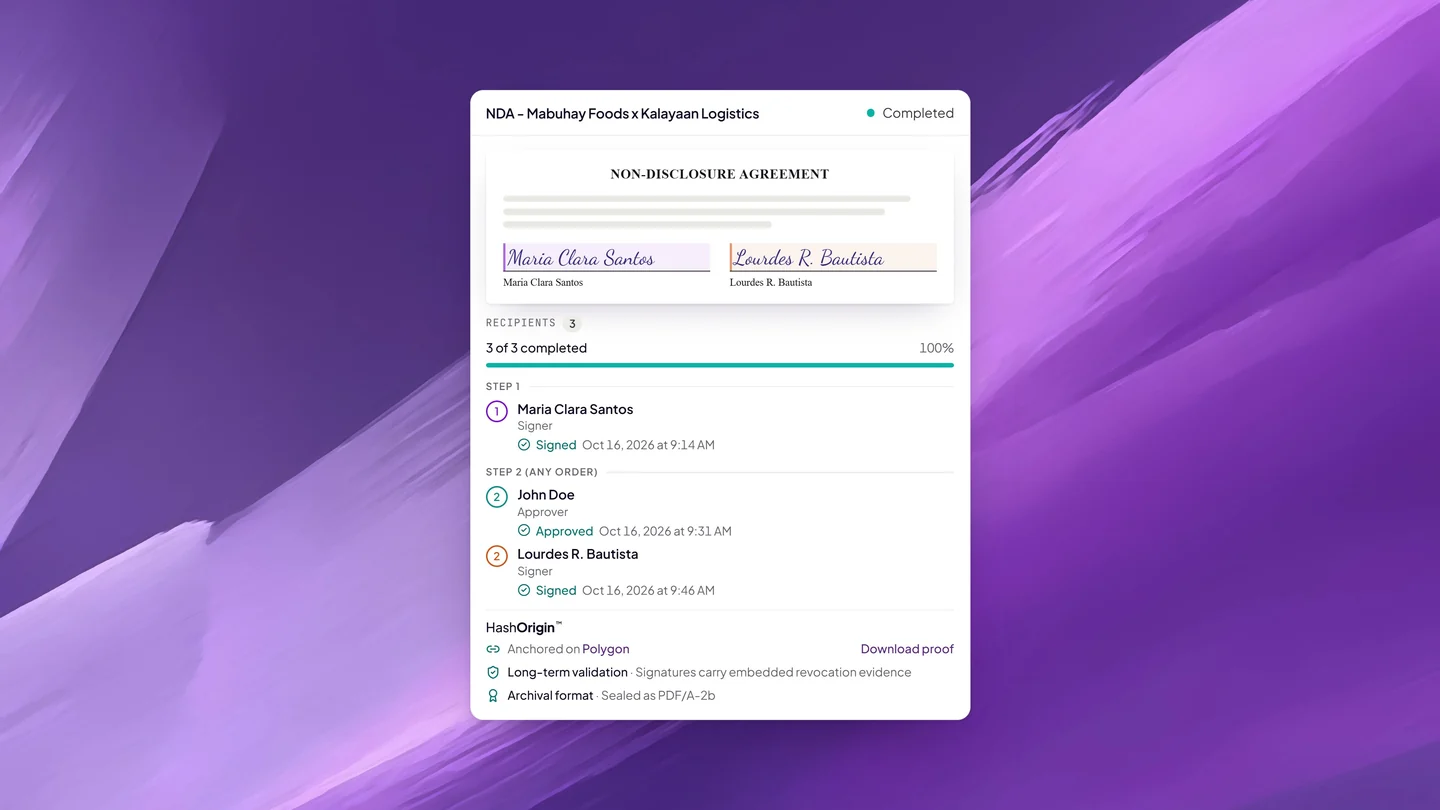
Requesting an appointment on Twala is free, and so is signing. Paid online with Pay, the act comes to the notarial fee the ENP sets at the session, plus 12% VAT added at checkout and documentary stamp tax. Your notary may instead choose cash payment, made to them directly. Identity verification has its own fee, shown before you start, and you pay it once for as long as the verification stays current.
The Rules put some limits around the fee. Notarial fees follow any guide on notarial fees the Supreme Court issues, the ENP may waive the fee in whole or in part, and the ENP may charge reasonable telecommunication and other incidental expenses.
Set all that against the paper route: the fare to the notary’s office and back, printing, a courier when a signer lives elsewhere, and a morning off work, sometimes for several people. How much online notarization costs breaks it down.
After notarization: what you get, and how to check it
Once the fee is paid, Twala finishes the job in one pass. It adds a notarial certificate page with the notary’s seal and a QR code, enters the act in the notary’s notarial register, and sends the document to the Supreme Court’s Central Notarial Database. You download the notarized PDF from Notarizations, and you can download it again whenever you need it.
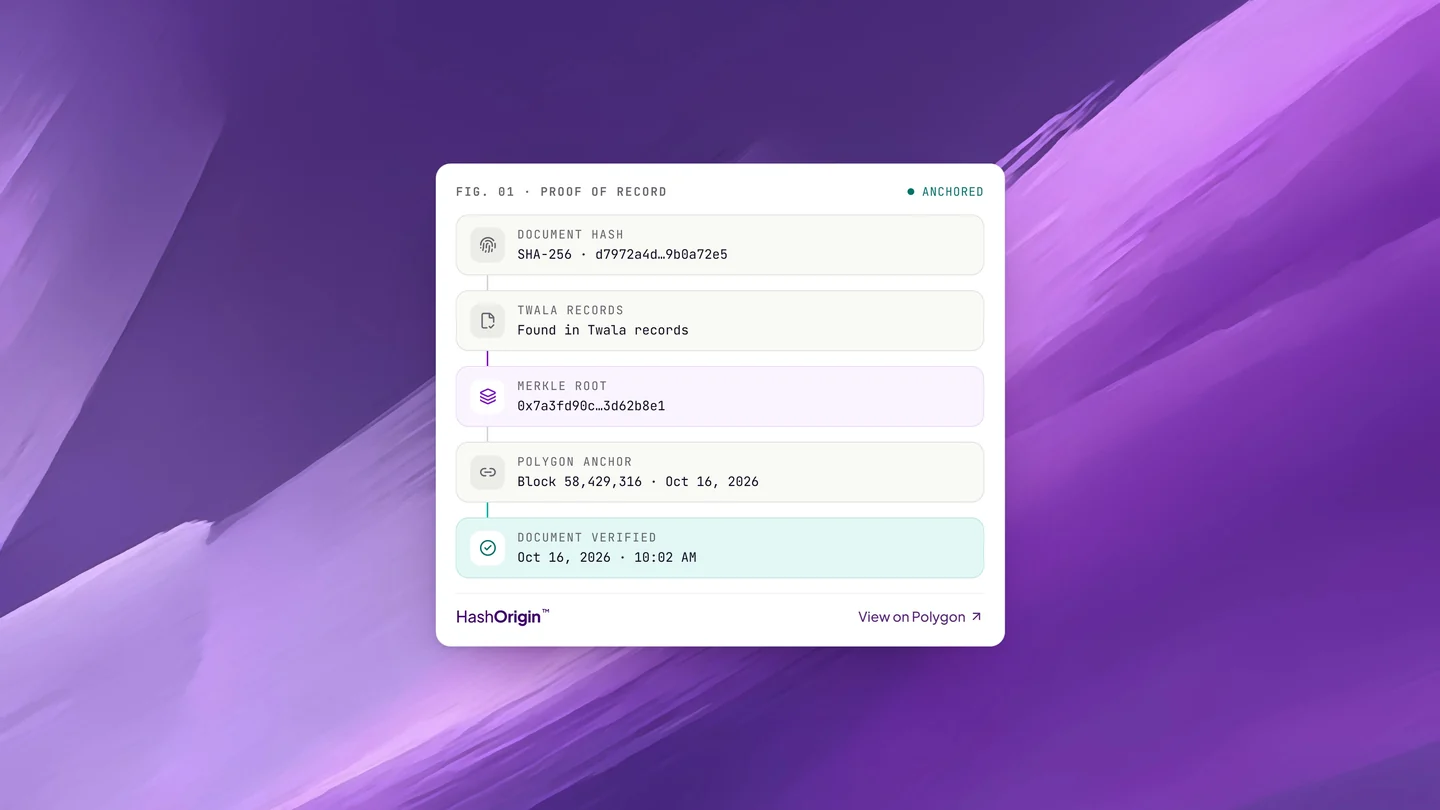
The file carries its own proof. It is converted to PDF/A-2b, the archival format, and sealed with a digital signature. Its fingerprint is then anchored on the Polygon blockchain through HashOrigin™, Twala’s document-sealing technology, so anyone holding a copy can check it without having to take Twala’s word for it. On Twala’s verify page, a genuine document checks out, and one changed after notarization shows as Document tampered.
That is why an eNotarized document should travel as a PDF. A printout can’t carry the digital signature or be checked for tampering the same way. Recipients can learn the checks in how to verify an eNotarized document, and your eNotarized PDF, explained walks through each part of the file.
Is it safe?
Paper notarization has a fraud problem the courts know well. Seals can be faked, signatures copied, and a notary’s name used without the notary’s knowledge. In a case that grew out of the Malampaya Fund scandal, documents allegedly bore the notarial seals and signatures of three lawyers, and the Supreme Court cleared them for lack of proof that they had allowed it. We wrote about that ruling when it came out.
The Rules answer with a technical baseline that every accredited ENF must meet: e-KYC consistent with Bangko Sentral rules, multi-factor authentication, liveness detection that catches presentation attacks, geolocation that detects VPNs, tamper-evident security, a way to verify eNotarized documents, real-time backup of notarial books, registration with the National Privacy Commission, a link to the Supreme Court’s database, and 99.9% uptime. Pre-recorded videos of people signing are strictly prohibited.
Accreditation is the floor. On Twala, the safeguards go further:
- A Philippine National ID is checked against the national registry itself, then matched to a face scan, and the act can’t be performed until every principal and witness is verified.
- Locations are checked both when you book and when you join, and VPNs, proxies, and Tor are blocked.
- Signatures are secure digital signatures, not images pasted onto a page.
- Every notarized PDF is sealed and anchored on a public blockchain, so anyone can confirm it hasn’t changed without relying on Twala alone.
- Every act goes into the notarial register and reaches the Supreme Court.
- A session is recorded only when the notary asks and everyone consents.
Read more in Is Online Notarization Safe? and, for the technical side, Inside Twala’s Security.
For businesses
Companies notarize a great deal: secretary’s certificates, board resolutions, special powers of attorney, contracts, and employment documents. On Twala, the same team workspace that drafts and signs those documents can send them for notarization. Owners and admins decide which members can use notary features, signatories bring their proof of authority to the session, and the notarized document can be saved back to the workspace, where it keeps its versions and is ready to search. Larger organizations can add single sign-on, SIEM integration, and a guaranteed SLA on the Enterprise plan. More in eNotarization for businesses.
For lawyers who want to become ENPs
A member of the Bar in good standing can apply for an electronic notarial commission if they are MCLE and ULAS compliant, have lived in the Philippines for at least a year, keep a regular place of work or business here, and have no final conviction for a crime involving moral turpitude. The application fee is ₱3,000, paid through the Judiciary ePayment System, and the Supreme Court asks for proof of training on an accredited ENF. Twala Academy’s course, Primer on eSignatures and eNotarization in the Philippines + Twala ENF 101, is free and meets that training requirement.
On Twala, applying is free, and notarizing needs only notary credits, with no subscription. The full process is in how to become an Electronic Notary Public, and why ENPs choose Twala covers the practice side.
For government offices
The Rules give eNotarized documents their legal effect. Whether citizens feel the difference depends on the offices that receive them. An agency that still asks for a printed, wet-signed copy sends people back to the queue. Atty. Bagro made the point at the October 19 launch: “Agencies and businesses must update their procedures so that electronic notarization translates into fewer queues, fewer trips, and lower costs for citizens and businesses.” Our note on how government offices can accept and verify eNotarized documents suggests where to start.
Why Twala
Twala has been part of the Supreme Court’s work on electronic notarization since its engagement with the Court began in July 2020. It was among the first three ENFs the Court accredited, and the Philippines’ first two eNotarized documents, agreements with the Integrated Bar of the Philippines and the UP College of Law, were notarized on Twala at the launch, witnessed by First Lady Louise Araneta-Marcos and Senior Associate Justice Marvic M.V.F. Leonen.
Twala is also a full document platform, with more than 1.3 million individual users and more than 600 companies served. Lex, the AI inside Twala, drafts documents and explains them before anyone signs; teams send them for eSignature; and finished documents are stored, searched, and verified in the same place. Its plan prices and its notary credit prices are published on its pricing and ENP pages. Twala is backed by the Department of Science and Technology through a DOST-PCIEERD startup grant and an R&D partnership with DOST-ASTI, and it was the only non-government awardee among the Anti-Red Tape Authority’s 21 Ease of Doing Business Champions in 2024. It is also open 24/7, so you can prepare, sign, and book at any hour (here is how that works).
The draft-to-notarized workflow shows how the pieces fit, and Why Twala makes the case for each kind of user.
Frequently asked questions
Is eNotarization legal in the Philippines?
Yes. The Supreme Court’s Rules on Electronic Notarization (A.M. No. 24-10-14-SC) took effect in March 2025, and the service launched to the public on October 19, 2026. An electronic notarial act performed through an accredited ENF has the same validity, force, and effect as a traditional one.
Can any notary public notarize online?
No. Only lawyers commissioned by the Supreme Court as Electronic Notaries Public can, and only through an accredited ENF. A regular notarial commission is not enough.
Is a video call with a notary the same thing?
No. The interim rules that allowed paper documents to be notarized over video were repealed. eNotarization needs a commissioned ENP, an accredited ENF, and an electronic document signed with a secure electronic or digital signature.
Do I have to be in the Philippines?
For a session on Twala, yes. Everyone appearing, and the ENP, must be in the Philippines, and locations are checked when you book and when you join.
How do I know an eNotarized document is real?
Upload the PDF to Twala’s verify page. A document altered after notarization shows as Document tampered.
How long is my identity verification good for?
Until the ID you verified with expires, or for three years, whichever comes first.
The rules are in place, the platforms are live, and the first documents have been notarized. To get started, create a free Twala account or read Get notarized. Businesses can compare plans on the pricing page, and lawyers can apply as an ENP.
Twala is a Supreme Court-accredited Electronic Notarization Facility (ENF). Twala is a technology provider and does not give legal advice. Notarial acts are performed by commissioned Electronic Notaries Public.