From Draft to Notarized: The Whole Document Workflow in One Platform

On Twala, a document goes from first draft to notarized PDF without ever leaving the platform. Here is that workflow, stage by stage, following one service agreement from Manila to Cebu and back.
Ask anyone who has closed a supplier contract the usual way. The draft bounces between inboxes as Word files named FINAL, FINAL-2, and FINAL-signed. Someone prints it. A messenger crosses the city with it, or a courier flies it to Cebu. The signed copy waits for a notary, then for a scanner, then for someone to drop it into a shared drive that nobody can search.
Every handoff is a chance for a delay, a missing page, or a version nobody can vouch for.
Twala replaces those handoffs with six stages in one place: generate, review, sign, eNotarize, store, and monitor. To show how they fit together, take a simple example. ABC Corp., a distributor in Manila, is signing a one-year service agreement with a supplier in Cebu, and both sides want it notarized.
1. Generate: the draft starts from your own files
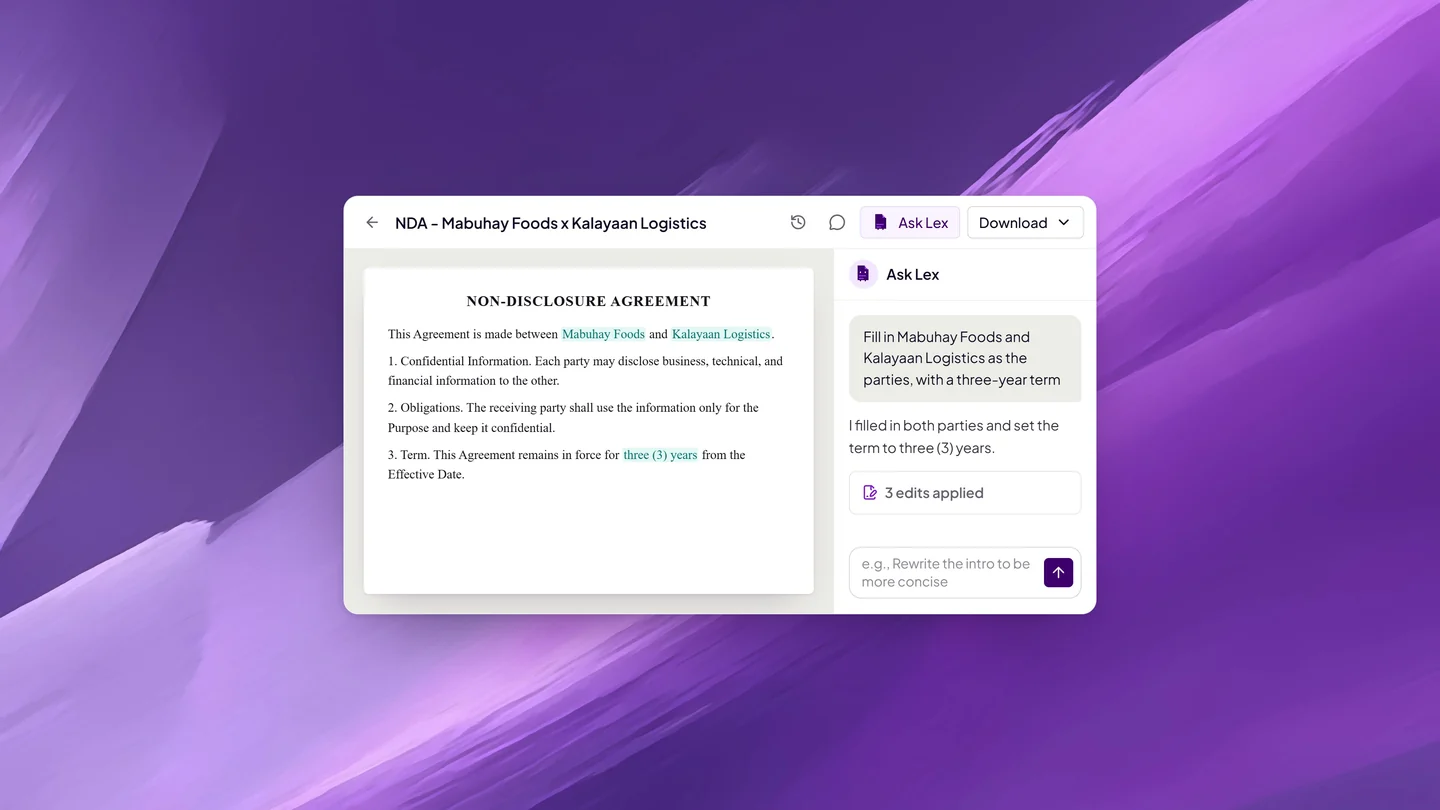
ABC Corp.’s operations manager opens Twala’s template gallery, which has templates for contracts, legal, compliance, corporate, finance, HR, marketing, and reports, and picks a service agreement. Instead of retyping last year’s terms, she asks Lex, the AI inside Twala, to draft from the files already in the workspace: the previous agreement and the supplier’s quotation.
Lex proposes its edits, and each proposal shows exactly what will change. Apply puts it into the document; Dismiss drops it. Nothing goes in on its own. The company’s lawyer leaves comments on two clauses, the manager replies in the thread, and both comments are resolved once the wording is settled. When the draft is final, she saves a PDF copy to the workspace, ready to send for signature. It can also be exported as a Word file if the supplier asks for one.
2. Review: both sides know what they are signing
Review happens on two sides of the table. Inside ABC Corp., the finance head opens the PDF in the browser, highlights the payment terms, adds a note, and compares the new version with last year’s side by side. Every saved annotation keeps the earlier version, so nothing is lost if someone changes their mind.
On the supplier’s side, Twala can explain the document before anyone signs: flags to review, a summary, and the key points. It doesn’t replace the supplier’s own lawyer. It does mean nobody signs a clause on the last page without knowing it is there.
3. Sign: one envelope, in the right order
The manager sends the agreement in an envelope. She makes the finance head an approver at step one, ABC Corp.’s president a signer at step two, and the supplier’s owner a signer at step three, then drags signature fields onto the right pages. Twala sends reminders automatically, and the envelope keeps a timeline of who sent, opened, signed, or declined, and when.
Recipients can sign through secure email links without a Twala account, and signing is always free for them. The two signatories who will appear before the notary later do need their own free accounts with a verified identity, since that is a requirement of the notarization, not of the signature.
This is also the step that makes eNotarization possible. The Supreme Court’s rules allow only secure electronic signatures and digital signatures on a document that is to be notarized, and an envelope signed on Twala carries Twala’s secure digital signature. Signing ahead works here because the agreement will be acknowledged: at the session, each signatory confirms to the notary that the signature on it is theirs. Affidavits are different, since the Rules have the affiant sign as part of the act, so for those, ask your notary when to sign.
4. eNotarize: the act happens where the document already is
Not every contract needs a notary. The parties want this one notarized because a notarized document becomes a public document, admissible in evidence without further proof of its authenticity, which matters for an agreement they may one day need to enforce.
The manager opens Appointments, clicks Request appointment, chooses Notarization, and picks the completed envelope. She sets the type to a contract, chooses Remote, picks an Electronic Notary Public (ENP) by city, and books one of the notary’s open times. The two signatories are added as principals. Because each signs for a company, each brings proof of authority, such as a board resolution or a secretary’s certificate.
At the scheduled time, the president joins from Makati and the supplier’s owner from Cebu City. Twala checks that everyone is in the Philippines, with no VPN, proxy, or Tor, as the Rules require. The notary confirms each person’s details and authority, each signatory confirms that the signature on the agreement is theirs, and the notary performs the acknowledgment and requests payment, due within 24 hours. Once it is paid, Twala adds the notarial certificate page and the notary’s seal with a QR code, enters the act in the notary’s notarial register, and files it with the Supreme Court.
Nobody boarded a plane, and no courier was booked. For a closer look at this stage, read how to notarize a document online and notarizing secretary’s certificates and board resolutions online.
5. Store: the notarized file lands where it can be found
The notarized agreement is saved to ABC Corp.’s supplier workspace, where it keeps its versions. Because the team turns on AI search for the file, Lex can answer questions about it months later, such as “What is the notice period for termination?”, and name the file its answer came from. Anyone with access can also find it by name from the search bar, alongside envelopes, notarizations, and templates.
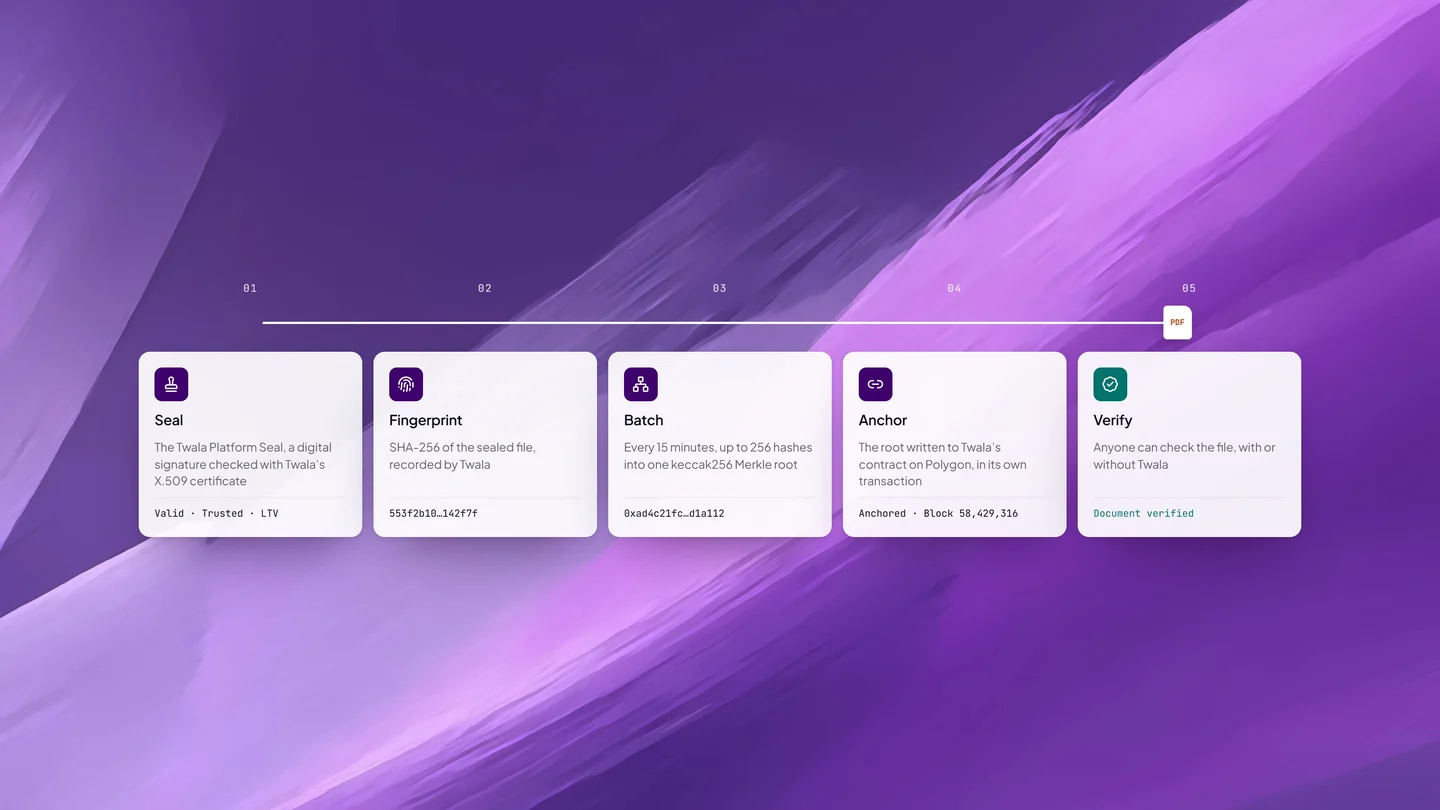
Access stays tight. Workspaces on a team are private until they are shared, and each teammate gets no access, view access, or edit access, item by item. The PDF itself is sealed and anchored with HashOrigin™ technology, so the supplier’s bank or an auditor can check it on Twala’s verify page at any time.
6. Monitor: nothing expires by surprise
A one-year agreement has a renewal date, and renewal dates have a way of being missed. The manager adds a task to the workspace’s board, links the agreement to it, assigns it to herself, and sets a due date sixty days before the term ends. Overdue tasks are marked on the card, so the reminder can’t hide.
Finance wants the numbers, not the PDF. Twala’s data extraction pulls the fields they name, such as the contract term, the renewal date, and the monthly fee, with a confidence level for each value, and downloads them as CSV for the spreadsheet. Envelope reports show which agreements are still out for signature and where each one is stuck. More on that in AI data extraction for contracts.
Why one platform matters
Each of these stages exists elsewhere as a separate tool. The difference is the record. On Twala, the draft, its comments, the envelope’s timeline, the notarial register entry, and the blockchain anchor all belong to the same document, so nobody has to reconcile five systems to prove what happened.
“We built Twala so a document never has to leave the platform to be trusted. It’s drafted, signed, notarized, and sealed in one place,” says Alexander Paul Quinit, Twala’s Co-founder and CTO.
Twala’s customers report agreements turning around 80% faster, with 40% saved in time and materials on each one. And since Twala is open 24/7, a contract can move forward at night or over a weekend, whenever the people on it are ready.
To try the whole workflow, create a free Twala account, see what each plan includes on the pricing page, or talk to our team about rolling it out across your company. You can also read how Lex drafts, reviews, and explains documents, and how companies run eNotarization at scale.
Twala is a Supreme Court-accredited Electronic Notarization Facility (ENF). Twala is a technology provider and does not give legal advice. Notarial acts are performed by commissioned Electronic Notaries Public.