Meet Lex: The AI Inside Twala That Drafts, Reviews, and Explains Documents

Lex is the AI inside Twala. It drafts documents from your files, answers questions and names its sources, searches Philippine law, and explains a contract before you sign it, and it never trains on your data.
If you have seen a small purple page with a folded corner, two eyes, and two legs wandering across twala.ai, that was Lex too. As Twala’s mascot, Lex never speaks; it answers in 8-bit chirps and pixel moves. (The name is said “lecks.”) Inside the product, Lex does quieter, more useful work, and this is a tour of it.
Ask questions, get answers with sources
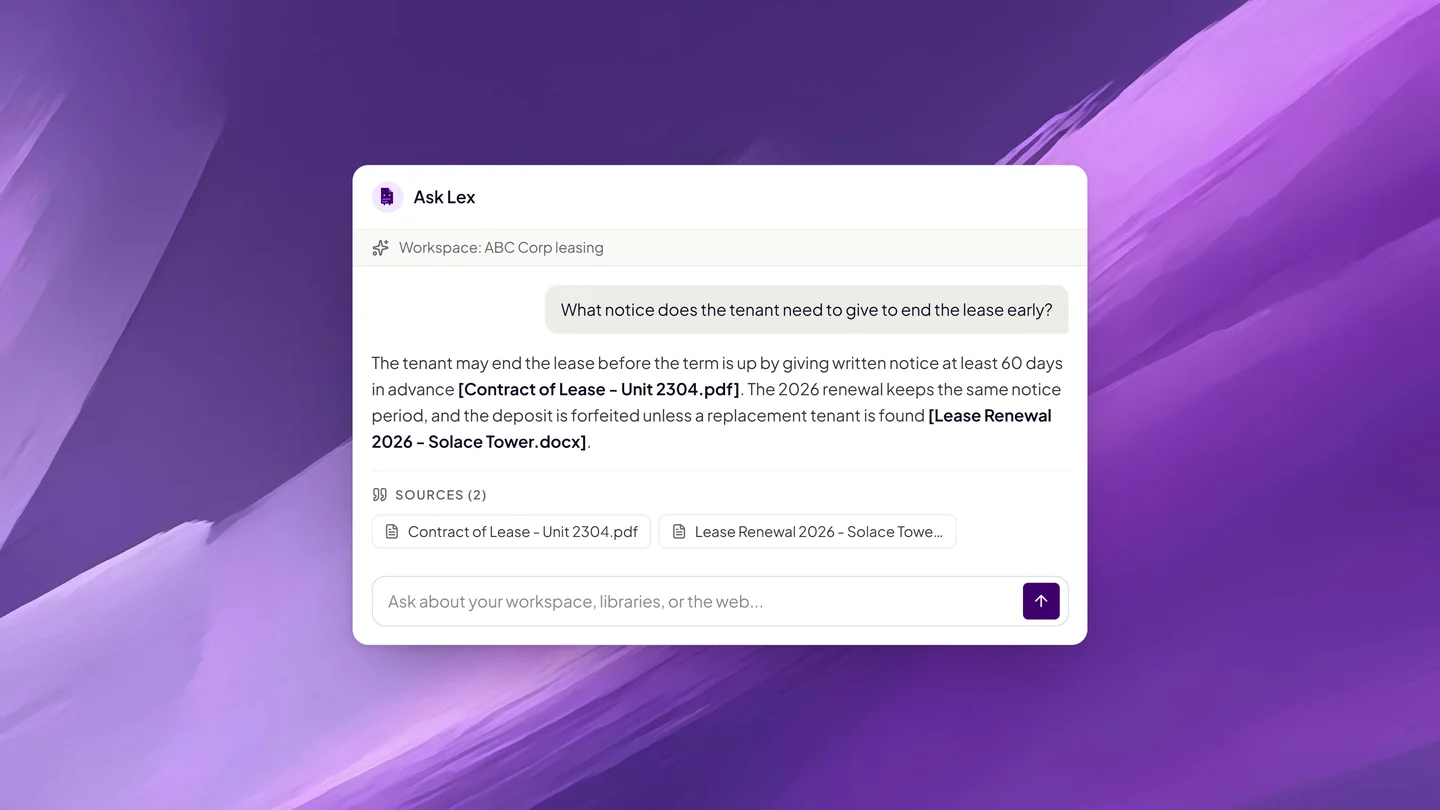
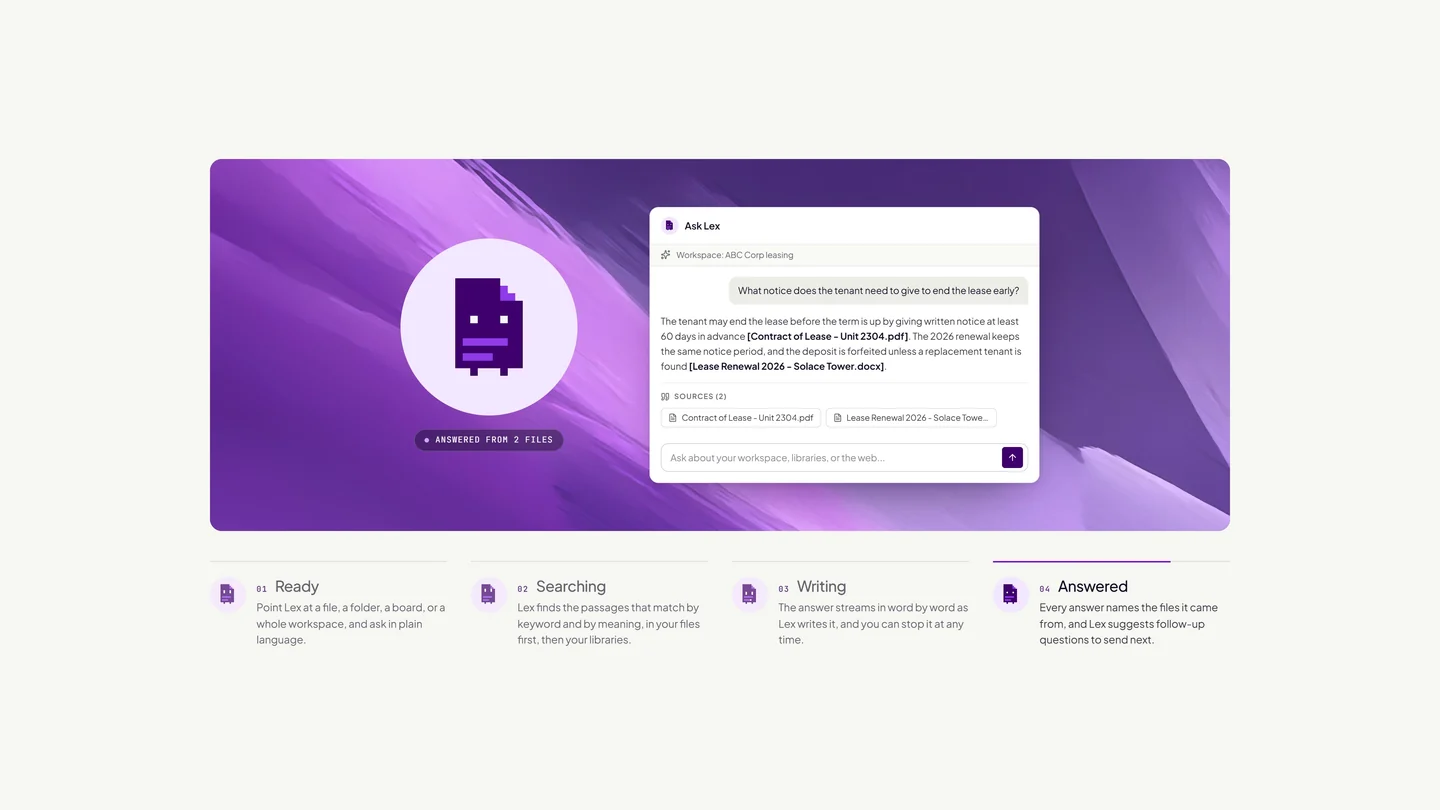
Most of the time, people use Lex to find something in documents they already have. Upload files with AI search turned on, and Twala splits each one into passages and indexes them. When you ask a question, Lex finds the passages that match best, by keyword and by meaning, writes the answer as it streams in, and lists the files it drew on.
That last part matters. An answer such as “the lease allows early termination with 60 days’ written notice” is only useful if you can open the lease and see the clause, so Lex always tells you where the answer came from.
You choose what Lex looks at. Chat about one file, a folder, a task board, or a whole workspace, or pick your sources on the Ask Lex page. Choose Fast for everyday answers or Thinking for slower, deeper reasoning you can expand above the answer. After each reply, Lex suggests follow-up questions you can send with a click, and every chat stays in one list so you can pick it up later.
Draft from your own files
Twala’s editor starts from a template gallery, with templates for contracts, legal, compliance, corporate, finance, HR, marketing, and reports, or from a blank page. Describe what you need, and Lex drafts from the document in front of you and the files in your workspace.
Lex doesn’t type into your document behind your back. Each change comes as a proposal that shows exactly what will change. Apply puts it in; Dismiss drops it. Colleagues can comment on selected text and reply in threads, and the finished document exports as PDF or Word, or saves as a PDF in the workspace, ready to send for signature. A walk-through of a full contract, from this first draft to a notarized PDF, is in from draft to notarized.
Explain a document before anyone signs
The person receiving a contract is often the one with the least time and the least help: a tenant reading a lease on a phone, a new hire with an employment contract, a supplier’s owner between deliveries. Before they sign, recipients can have Twala explain the document, with flags to review, a summary, and the key points.
It is a reading aid, not a substitute for a lawyer, and it works in both directions. A signer who understands the document is less likely to dispute it later.
Search Philippine law when your files run out
Sometimes the answer isn’t in your documents. Lex can draw on knowledge libraries that Twala prepares and keeps up to date, starting with Philippine Laws and Jurisprudence: Republic Acts, case law, Supreme Court decisions, legal opinions, and regulatory materials, more than 200,000 documents in all.
The order is fixed. Lex reads your files first and searches a library only when they leave a gap. It goes to the web only if you turn on web search for that message. While it searches, the answer shows which library it is reading, and the library is cited by name. Libraries come with every plan at no extra charge; answers use your plan’s AI allowance. Lawyers will want the longer version in AI legal research for Philippine lawyers.
Pull out the data, tag what comes in
A signed contract is also a set of facts: a term, a renewal date, a monthly fee, a counterparty. With data extraction, you name the fields you need, up to 30 of them, each typed as text, number, date, currency, yes or no, or a list. Twala reads the file and returns each value marked High, Medium, or Low confidence. You can correct a value before you download the results as CSV for a spreadsheet or JSON for another system, and save the fields as a template for the next file. More in AI data extraction for contracts.
Once Lex has read a file, Smart tags also suggests tags from what it says. Click a suggestion to add it, and a suggestion for a tag you don’t have yet creates it.
Private by design
Legal and business documents are confidential, and the AI has to treat them that way. Lex runs privately, under Twala’s own cloud account. Files and their search indexes are kept under the same account, and every search is filtered by workspace, so Lex answers only from files you are allowed to open.
AI search is opt-in for each file. A file uploaded with it off is stored like any other, and Lex cannot answer from it. On a team, owners and admins can switch AI features on or off for each member. And no user data is ever used to train the AI. The rest of the security model is on our security page.
What Lex is not
Lex is not a lawyer, and Twala does not give legal advice. Lex can be wrong, which is exactly why it shows its sources and why nothing reaches your document until you apply it. The judgment stays with you. We wrote more about that balance in using AI in legal practice without losing control of the work.
Where you’ll find Lex
Lex is in every chat, every workspace, and the document editor’s assistant. Every plan includes it, with a monthly AI allowance that grows with the plan: 50,000 tokens on the free Personal plan, 500,000 on Professional, 1,000,000 on Business, 2,000,000 on Business Plus, and a custom amount on Enterprise. See the pricing page for the details, or explore every capability on the features page.
Frequently asked questions
Does Twala use my documents to train its AI?
No. No user data is ever used to train the AI, and Lex runs privately under Twala’s own cloud account.
Can Lex read every file I upload?
Only the files you turn AI search on for, and only within workspaces you can open. A dot on each file shows whether it is included as context.
Is Lex on the free plan?
Yes. The free Personal plan includes 50,000 AI tokens a month, and the Philippine Laws and Jurisprudence library comes with every plan at no extra charge.
Can Lex tell me if my contract is legally sound?
Lex can point out clauses to review and summarize what a document says, but it is not a lawyer and Twala does not give legal advice. For a legal opinion, ask a lawyer.
The easiest way to meet Lex is to give it a document. Create a free Twala account, upload a contract with AI search on, and ask it what you would ask a colleague.