How to Verify an eNotarized Document in the Philippines
To verify an eNotarized document in the Philippines, check the PDF itself: run it through the notarizing platform’s verification page and your PDF reader’s signature check, then read the notarial certificate page.
Banks, HR teams, landlords, and government offices are starting to receive notarized documents that never existed on paper. Whoever is on the receiving end has a fair question to ask: was this PDF really notarized, and has anyone touched it since?
With paper, you look at the dry seal, the notary’s signature, the commission details, and the Doc. No., Page No., Book No., and Series at the bottom of the page, and you hope none of it was faked. With an eNotarized document, the proof travels inside the file. You can check it yourself, at your desk, without calling the notary.
First, ask for the PDF, not a printout
An eNotarized document carries its proof as digital signatures and a fingerprint, and both exist only in the original file. A printout, a photo, or a scan of a printout loses all of it. What you are left with is a picture of a notarized document, which is exactly what a forger would hand you.
So ask the sender for the notarized PDF as it was downloaded from the platform. On Twala, the principal downloads it from Notarizations at any time and can send it like any other file. Keep that same file in your records. Don’t print it and scan it back in.
Step 1: Run it through the verify page
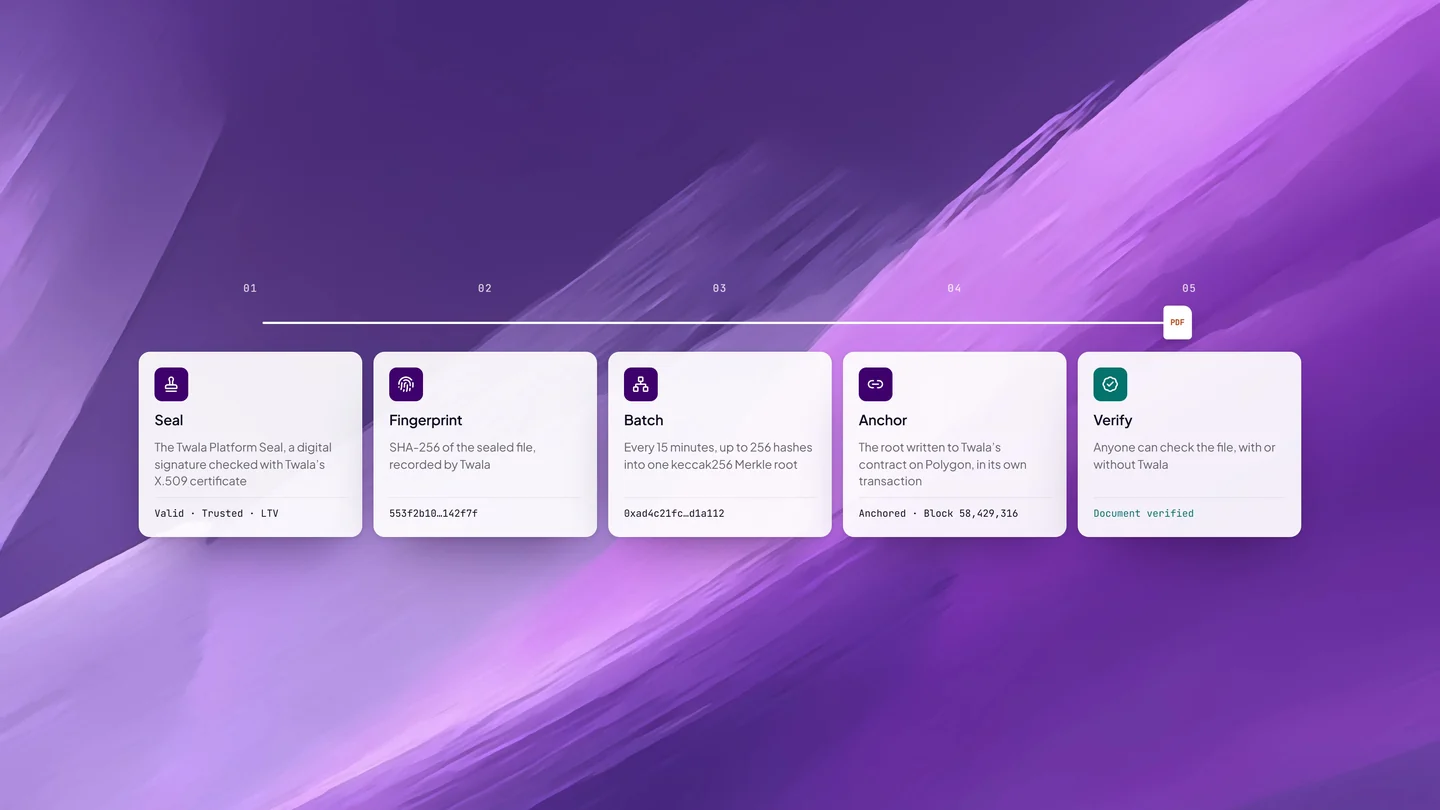
For a document notarized on Twala, open Twala’s verify page and add the PDF. Twala computes the file’s SHA-256 fingerprint and shows its proof of record:
- Document hash: the fingerprint of the exact file you added
- Twala records: whether that fingerprint matches the one Twala recorded when the document was sealed
- Merkle root: the batch of fingerprints it was anchored with
- Polygon anchor: the block on the Polygon blockchain where that batch was recorded
- The verdict: Document verified, or Document tampered if anything in the file has changed since it was sealed
The check is strict on purpose. Change one figure in a lease, swap a page, or correct a misspelled name, and the fingerprint no longer matches. There is no “close enough.” The verify page also checks the seal’s certificate against Twala’s trust registry.
Step 2: Check the signatures in your PDF reader
Every document Twala notarizes is sealed with the Twala Platform Seal, a standard digital signature made with Twala’s X.509 certificate. Open the file in a PDF reader that checks signatures, such as Adobe Acrobat, and open its signature panel. It confirms whether the document has changed since it was sealed, and it shows the trusted timestamp each signature carries, issued under the RFC 3161 standard.
Don’t be alarmed if your reader doesn’t show Twala as a trusted signer. The seal is made with a certificate from Twala’s own certificate authority, and whether a reader recognizes it depends on which authorities that reader trusts, not on the document. What the reader can always tell you is whether the file changed after it was sealed. For the certificate itself, Twala’s verify page is the reliable check, which is why the two work best together.
Step 3: Read the notarial certificate page
When an act is completed, Twala adds a notarial certificate page with the notary’s seal. Read it the way you would read the notarial certificate on a paper document. It should name the Electronic Notary Public (ENP) and the notarial act performed, such as an acknowledgment or a jurat, and it carries the act’s entry in the notary’s notarial register: Doc. No., Page No., Book No., and Series.
Then check the substance. If a special power of attorney was supposed to be acknowledged by the principal, the person named should be the person you are dealing with. Verification tells you the document is genuine and unchanged. It doesn’t tell you the right person signed for the right purpose; that judgment is still yours, as it was with paper.
A word on the QR code on the seal: it is a handy first look, but don’t stop there. Anyone can copy a QR code onto a forged page. Nobody can copy a matching fingerprint and an intact digital signature onto a different file, which is why steps 1 and 2 carry the weight.
Optional: check it without relying on Twala
HashOrigin™, the technology under every Twala seal, is designed so you don’t have to take Twala’s word for it. Each batch’s Merkle root is written to Twala’s contract on Polygon, a public blockchain, in its own transaction. Using the document’s anchor proof, you can recompute the root from the file with your own tools and compare it with what is on the chain. The technical overview and a sample verifier are at hashorigin.io, for teams that would rather check than trust.
Most recipients will never need this. For auditors, banks, and records offices that keep documents for decades, it means the proof doesn’t depend on any single company’s database. Our explainer on how blockchain anchoring works goes through it step by step.
Red flags
- The “notarized” PDF has no digital signature at all, only an image of a stamp and a signature pasted onto the page
- The verify page shows Document tampered, or the fingerprint isn’t in Twala’s records
- Your PDF reader reports that the document was modified after it was signed
- You were sent only a photo, a screenshot, or a printout, and the sender can’t produce the file
- The certificate names a notary or a platform you can’t confirm (the Supreme Court announces accredited facilities on its eNotarization page)
A failed check isn’t always fraud. Opening a PDF in an editor and saving it again changes the file, and the fingerprint with it. Ask the sender for a fresh copy downloaded straight from Twala. If that one fails too, don’t rely on the document. Our guide to spotting fake online notaries covers what a counterfeit usually looks like.
For offices that receive notarized documents every day
Write the check into the procedure: accept the PDF by email or upload, verify it on receipt, and keep the original file. It is faster than inspecting dry seals under a lamp, and it catches alterations that a person reading a printout would miss.
The alternative, printing the PDF so it can sit in a folder, throws away the very thing that makes it trustworthy. Atty. Third Bagro, Twala’s co-founder and general counsel, put it bluntly in The Last Mile of Digitalization: “That is not digital transformation. It is a paper process with a website attached.” Government offices can start with our guide on accepting and verifying eNotarized documents.
Frequently asked questions
Can I verify a printed copy of an eNotarized document?
Not reliably. The digital signatures and the fingerprint live in the PDF, so a paper copy can’t be checked the same way. Ask for the file.
What does “Document tampered” mean?
The file you checked is not the file that was sealed. Something changed after notarization, whether a deliberate edit or an innocent re-save in another app. Ask for a fresh copy from the sender before you draw conclusions.
Does a verified document prove the notarization was done properly?
It proves the document is the one that was sealed after the act and that it hasn’t changed since. Every act is also entered in the notary’s Electronic Notarial Book, and the notarized document is uploaded automatically to the Supreme Court’s Central Notarial Database. If you need more, the Rules let any person ask the notary to inspect an entry in the book by showing an ID and stating a purpose.
What exactly is inside an eNotarized PDF?
A certificate page, the notary’s seal, digital signatures, timestamps, and an archival PDF/A-2b format. Our guide to the eNotarized PDF takes it apart piece by piece.
To see how a document gets to this point, read our complete guide to eNotarization in the Philippines, or see how HashOrigin technology seals every Twala document.
Twala is a Supreme Court-accredited Electronic Notarization Facility (ENF). Twala is a technology provider and does not give legal advice. Notarial acts are performed by commissioned Electronic Notaries Public.