Your eNotarized PDF, Explained: Certificate Page, Seal, QR Code, and Copies
An eNotarized document from Twala is a PDF: your signed document plus a notarial certificate page with the Electronic Notary Public’s seal and a QR code, sealed so that any later change can be detected.
It looks simple when it lands under Notarizations in your account. Inside, though, the file carries several layers of proof that a paper document never had, and knowing what they are tells you how to keep it, share it, and defend it if someone ever questions it.
What’s inside the file
Open the PDF and you’ll see two things: your document and, after it, the notarial certificate page. What you can’t see matters just as much. Four layers make up an eNotarized PDF on Twala:
- Your document, as signed. Every signature on it was applied on Twala with its secure digital signature, the kind the Rules on Electronic Notarization (A.M. No. 24-10-14-SC) require for notarization.
- The notarial certificate page. Twala adds it once the notarial fee is paid. It carries the notary’s seal, with a QR code, and states the act the Electronic Notary Public (ENP) performed.
- A digital seal over the whole file. The Twala Platform Seal is a digital signature made with Twala’s X.509 certificate, applied to the finished PDF, with a trusted RFC 3161 timestamp inside it.
- A fingerprint on a public blockchain. Twala records the sealed file’s SHA-256 hash and, every 15 minutes, anchors a batch of these fingerprints on the Polygon blockchain through HashOrigin™ technology.
Outside the file, the act also lives in two official records. It is entered in the notary’s Electronic Notarial Book, under the familiar Doc. No., Page No., Book No., and Series of the year, and the notarized document is uploaded automatically to the Supreme Court’s Central Notarial Database, as the Rules require.
Why the file is a PDF/A-2b
Before sealing, Twala converts the document to PDF/A-2b, the archival form of PDF defined in ISO 19005-2. A PDF/A carries what it needs to display, such as its fonts, inside the file itself, so it opens the same way years from now on a computer that has never seen it before. For a document that may have to prove a sale, a loan, or an inheritance a decade from now, that matters more than it sounds.
Share the file, not a printout
A printout of an eNotarized PDF is a picture of it. The digital signatures, the timestamp, and the link to the blockchain anchor don’t survive the trip to paper, so whoever receives a printout can’t check it the way they could check the file.
When a bank, an employer, or an agency asks for your notarized document, send the PDF you downloaded from Twala, by email or through their upload portal. And send it untouched. Don’t edit it, merge it with other files, run it through a PDF compressor, or “print to PDF” a fresh copy. Any of these changes the file, and a changed file shows as Document tampered when it’s verified, even if nobody meant any harm.
If an office still insists on paper, ask whether it will accept the PDF and verify it instead. As Atty. Third Bagro wrote of digital processes that end in a printout, “That is not digital transformation. It is a paper process with a website attached.” Our guide on how government offices can accept and verify eNotarized documents is a useful thing to forward.
How the person receiving it can check it
The reliable check is Twala’s verify page. It traces the file’s proof of record from its fingerprint to the Polygon anchor. If even one character has changed since sealing, the page shows Document tampered.
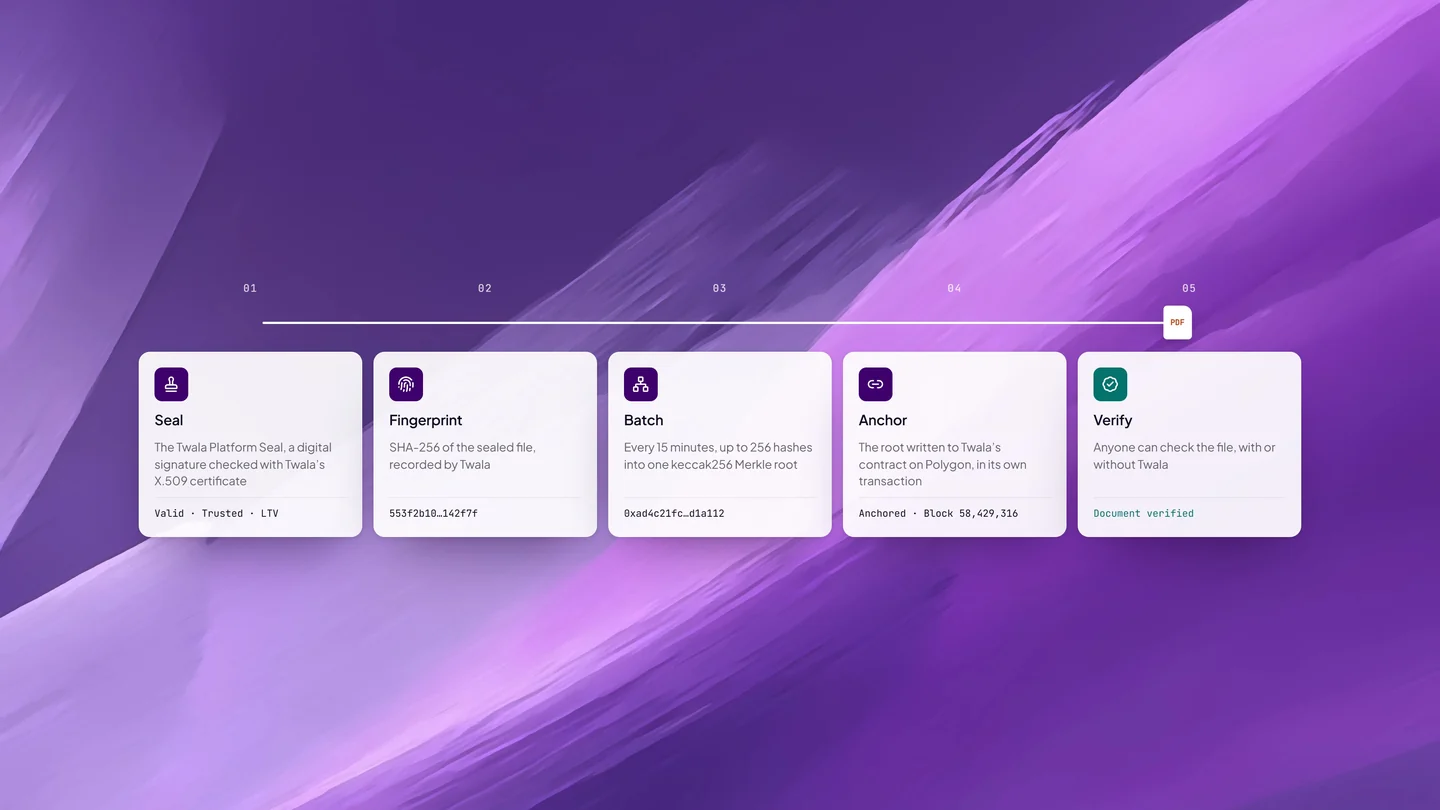
Because the fingerprint sits on a public blockchain, the check doesn’t rest on Twala’s word alone. Anyone can confirm the anchor independently, with or without Twala.
A PDF reader that checks digital signatures, such as Adobe Acrobat, can also confirm that the file hasn’t changed since it was sealed. It may not recognize the signer, though, because the Twala Platform Seal is made with a certificate from Twala’s own certificate authority, which your reader may not trust by default. That message is about the reader’s trust list, not about your document. Use the verify page for the definitive answer. Our step-by-step guide on how to verify an eNotarized document walks a recipient through both.
Where your copy lives, and who else can see it
Your notarized PDF stays under Notarizations in your Twala account, and you can download it again whenever you need it. No trip back to the notary’s office for a certified copy.
Access is narrow by design. The notary and the principals can open the notarized document. Witnesses see the notarization’s status and register details, but never the document itself. A witness who needs a copy clicks Request copy and states a purpose; the notary approves it, free or for a fee, or denies it with a reason. The witness follows the request under Copy requests, and an approved copy can be downloaded once.
The notary keeps the records of each act for the duration of the commission, or longer if a court directs. Under the Rules, anyone may ask to inspect an entry in the notary’s Electronic Notarial Book by presenting an ID and stating a purpose.
For your own filing, save the notarized PDF to a Twala workspace. There it keeps its versions, turns up in search, and, if you turn on AI search for the file, can be read by Lex, the AI inside Twala, when you have a question about it. See how drafting, signing, notarizing, and storing fit together in one place.
Frequently asked questions
Can I print my eNotarized document?
You can print a copy for your own reference. Just remember that a printout can’t be verified the way the PDF can, so when someone needs proof, send the file.
Does an eNotarized document expire?
The notarization has no expiry date of its own, although some offices accept only recently executed documents, so check if yours does. On the technical side, Twala embeds long-term validation evidence in the signatures when every signature has it, so they can still be checked after their certificates expire, and an anchored fingerprint can’t be altered.
I found a typo after notarization. Can I fix it?
Not in the notarized file. Any change breaks the seal and shows as tampered. Talk to your notary about executing a corrected document and notarizing that one.
Can I get the session recording?
If the session was recorded, which happens only when everyone consents, only the notary can open the recording.
New to all of this? Start with how to notarize a document online or the complete guide to eNotarization in the Philippines, then get notarized on Twala.
Twala is a Supreme Court-accredited Electronic Notarization Facility (ENF). Twala is a technology provider and does not give legal advice. Notarial acts are performed by commissioned Electronic Notaries Public.