How to Notarize a Lease Agreement Online in the Philippines

A lease agreement can be notarized online in the Philippines: the landlord and the tenant sign it on Twala, then acknowledge it before an Electronic Notary Public over live video, even from different cities.
Take a condo owner in Quezon City renting out a unit near Cebu IT Park to a nurse moving up from Davao for a new job. Under the 2004 Rules on Notarial Practice, a notary could act only within the territory of the court that commissioned them, so a lease between people in different cities meant somebody traveling, or a signed copy riding a courier van. Electronic Notaries Public (ENPs) can notarize for parties anywhere in the Philippines. The owner can appear from Quezon City and the tenant from Cebu, in the same session.
Does a lease have to be notarized?
Not to bind the landlord and the tenant. A lease is a consensual contract, valid between the parties once they agree, and under the Statute of Frauds in Article 1403 of the Civil Code, a lease longer than one year must be in writing to be enforceable. Notarization adds three things a private lease doesn’t have:
- Proof. A notarized lease is a public document, admissible in court without further proof that it is genuine.
- Protection against third persons. Under Article 1648 of the Civil Code, an unrecorded lease of real estate does not bind third persons, and only a notarized lease can be recorded with the Registry of Deeds. Article 1676 adds that a buyer of leased land may end an unrecorded lease, unless the buyer knew of it or the sale says otherwise.
- Paperwork that offices ask for. Many businesses renting an office or a store are asked for a notarized lease when they apply for or renew their permits.
For an ordinary apartment rental, plenty of landlords and tenants notarize anyway, because a notarized lease is much harder to dispute later.
Notarizing a lease on Twala
A lease is notarized by acknowledgment, so both parties can sign it on Twala before the session and confirm their signatures to the ENP when they appear. The steps:
- Prepare the lease. Start from a contract template in Twala’s template gallery, or upload the lease you already use. Lex, the AI inside Twala, can propose clauses, such as a clearer clause on the deposit and its refund, but you decide what goes in, and a lawyer can check the final text.
- Send it for signing. Put the lease in an envelope with the landlord and the tenant as signers, in the order you choose, plus any witnesses the form has lines for. Twala sends reminders until everyone has signed. If you already signed the lease in another eSignature tool, upload the PDF and have it signed on Twala, since Twala notarizes documents signed with its own secure digital signature.
- Verify identities. Everyone who will appear before the notary needs a free Twala account and a current identity verification: a Philippine National ID or another government-issued ID that hasn’t expired, followed by a face scan. It’s done once and stays current until the ID expires or for three years, whichever comes first.
- Book the notarization. One party opens Appointments, clicks Request appointment, chooses Notarization, adds the signed lease, chooses Remote, picks an ENP and one of their open times, and adds the other party as a principal.
- Appear. At the scheduled time, both parties click Join session from their own devices, with VPNs off. The ENP confirms each person’s identity and that they understood and signed freely, and both acknowledge the lease.
- Pay and download. The ENP requests payment, due within 24 hours, so agree beforehand who pays. Once it’s paid, the notarized PDF is under Notarizations for both principals.
The full walkthrough is in how to notarize a document online in the Philippines.
If a broker or a relative signs for the owner, they need written authority. For a lease of real property longer than one year, Article 1878 of the Civil Code requires a special power of attorney, and the ENP will want to see it. Our SPA guide explains how to prepare one.
If you plan to register the lease
Long leases, and leases a tenant wants protected against a future buyer, are often recorded with the Registry of Deeds. Check whether the registry where the property is located accepts electronically notarized documents, and what it requires, before you file. Our post on eNotarization in real estate covers what works today.
After signing: keep track of the lease
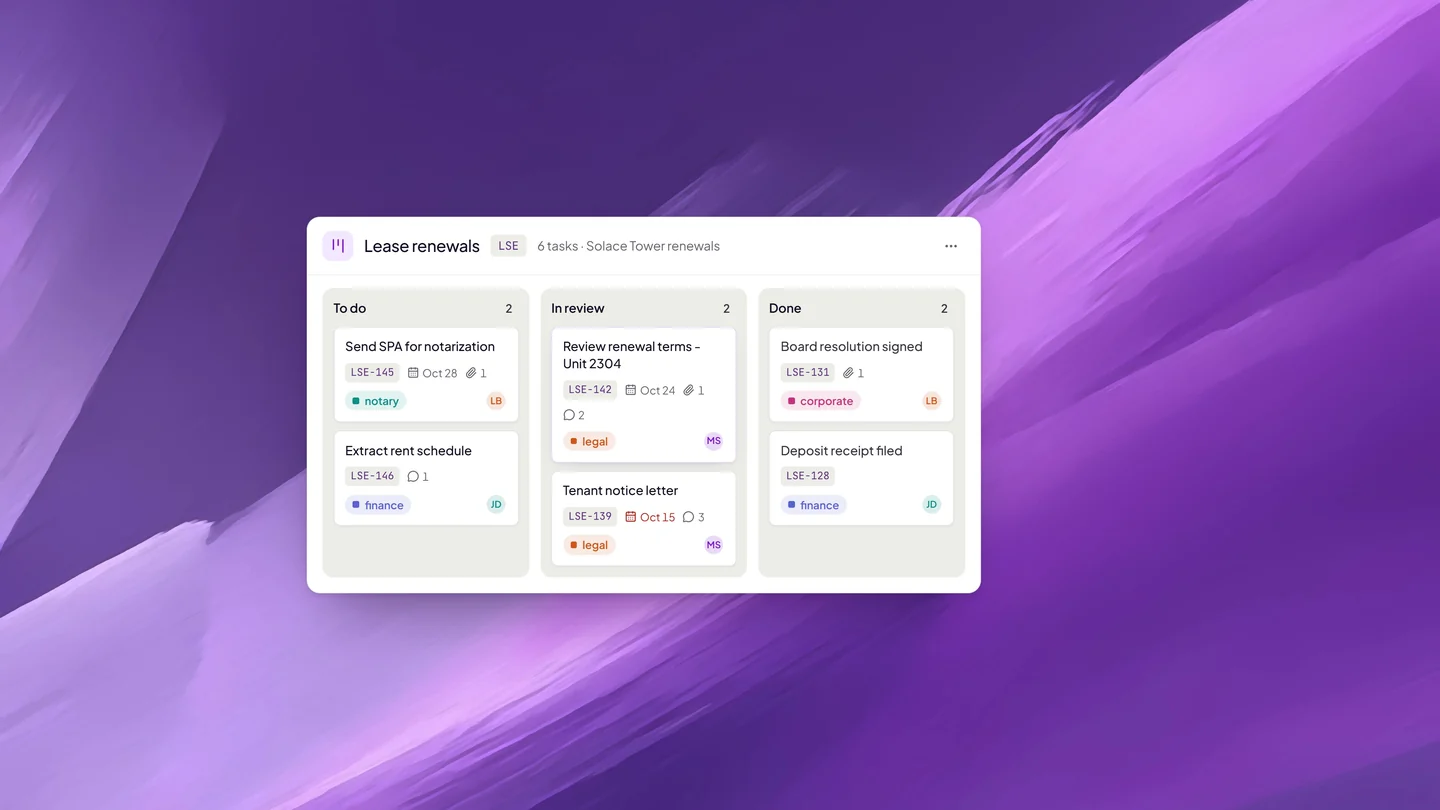
A lease isn’t finished when it’s notarized. The rent changes, the deposit has to be returned, and the end date arrives sooner than anyone expects. Save the notarized lease in a Twala workspace, where it keeps its versions and turns up in search. Then put the renewal on a task board: a card with the end date as its due date, assigned to whoever handles renewals, gets marked once it’s overdue.
Property managers with dozens of units can go further. Twala’s data extraction reads each lease and pulls the fields you name, such as the monthly rent, the deposit, and the start and end dates, into a table you can check and download as CSV or JSON. Our post on AI data extraction for contracts shows how.
Frequently asked questions
Do we need witnesses for a lease?
Only if your lease form has lines for them. If it does, each witness signs on Twala, appears in the session, and needs a free account and a current identity verification.
Will the city hall accept an eNotarized lease for my business permit?
Ask before you apply. Offices are updating their requirements for electronically notarized documents at different speeds, and the office will tell you whether it wants the PDF uploaded, emailed, or presented some other way.
Can we notarize a renewal or an amendment the same way?
Yes. A renewal, an extension, or an amendment is its own document, signed on Twala and acknowledged in a session just like the original.
Can the tenant check that the lease wasn’t changed after notarization?
Yes. Anyone holding the notarized PDF can check it on Twala’s verify page. If anything in it changed after notarization, it shows as “Document tampered.” More in how to verify an eNotarized document.
Ready to sign? Create a free Twala account, and read Get notarized for the details of each step. For the rules behind remote notarization, see our complete guide to eNotarization in the Philippines.
Twala is a Supreme Court-accredited Electronic Notarization Facility (ENF). Twala is a technology provider and does not give legal advice. Notarial acts are performed by commissioned Electronic Notaries Public.