How Government Offices Can Accept and Verify eNotarized Documents

Government offices can accept eNotarized documents now. Under the Supreme Court’s rules they carry the same legal effect as notarized paper, and an officer can check one at the counter without asking anyone to print it.
The harder part is the counter itself. Picture the business permits office of a provincial capital, or the records section of a regional office. An applicant opens a PDF on her phone. It was notarized the day before by an Electronic Notary Public (ENP) in Quezon City while she stayed home in Tacloban. The checklist taped to the window still says “notarized original,” and nobody has told the officer what an eNotarized document looks like. So the officer asks for a printout with a dry seal.
At that moment the applicant holds a document the law recognizes, in front of an office that cannot receive it. Atty. Third Bagro, Twala’s co-founder and general counsel, has a name for that kind of process in The Last Mile of Digitalization: “That is not digital transformation. It is a paper process with a website attached.”
This guide is for the people who can fix it: heads of offices, records officers, legal and compliance units, and the frontline staff who see the documents first.
What the law already allows
Three rules matter here, and none of them is new to government.
- The Electronic Commerce Act (R.A. 8792) has recognized electronic documents and signatures since 2000. Despite its name, it covers government transactions as well as commercial ones.
- The Rules on Electronic Notarization (A.M. No. 24-10-14-SC), in effect since March 2025, give an electronic notarial act performed through an accredited Electronic Notarization Facility (ENF) the same validity, force, and effect as a traditional one.
- The Ease of Doing Business and Efficient Government Service Delivery Act (R.A. 11032) exists to cut the steps, documents, and waiting that stand between citizens and a government service.
A notarized document, on paper or electronic, is a public document. It is admissible in evidence without further proof of its authenticity, and it enjoys a presumption of regularity that only clear and convincing evidence can overturn. None of that changes because the document arrives as a PDF.
What the law does not do is rewrite an agency’s forms. At an eNotarization webinar with Twala, Land Registration Authority Administrator Atty. Gerardo P. Sirios named the absence of a clear policy on accepting paper versus electronic documents as the first challenge the LRA had to solve before eNotarization and digital titling could work in full. “We are really very excited,” he said. “We have sent our position paper to the Supreme Court to address these issues.” (Read the LRA story.)
That policy work is now happening in writing. On October 13, 2026, the Supreme Court signed joint memorandum circulars with the LRA and with the Securities and Exchange Commission: SC-LRA JMC No. 1, s. 2026, guidelines for using electronically notarized documents in transactions with the LRA and the Registers of Deeds, and SC-SEC JMC No. 1, s. 2026, on accepting and integrating electronically notarized documents in SEC systems and transactions. Associate Justice Alfredo Benjamin Caguioa said the circulars “categorically clarify the acceptability of eNotarized documents” (Supreme Court announcement).
The land registry and the corporate regulator now have guidelines. Most other offices still have a checklist that predates eNotarization. The encouraging part is that the fix is mostly procedural, and an office can start without buying anything.
How to verify an eNotarized document at the counter
Teach frontline staff one short routine. For a document notarized on Twala, it goes like this:
- Ask for the PDF itself. Have the applicant email or upload the file, or open it on their own device. A printout, a screenshot, or a scan of a printout has lost the digital signatures that make the document checkable.
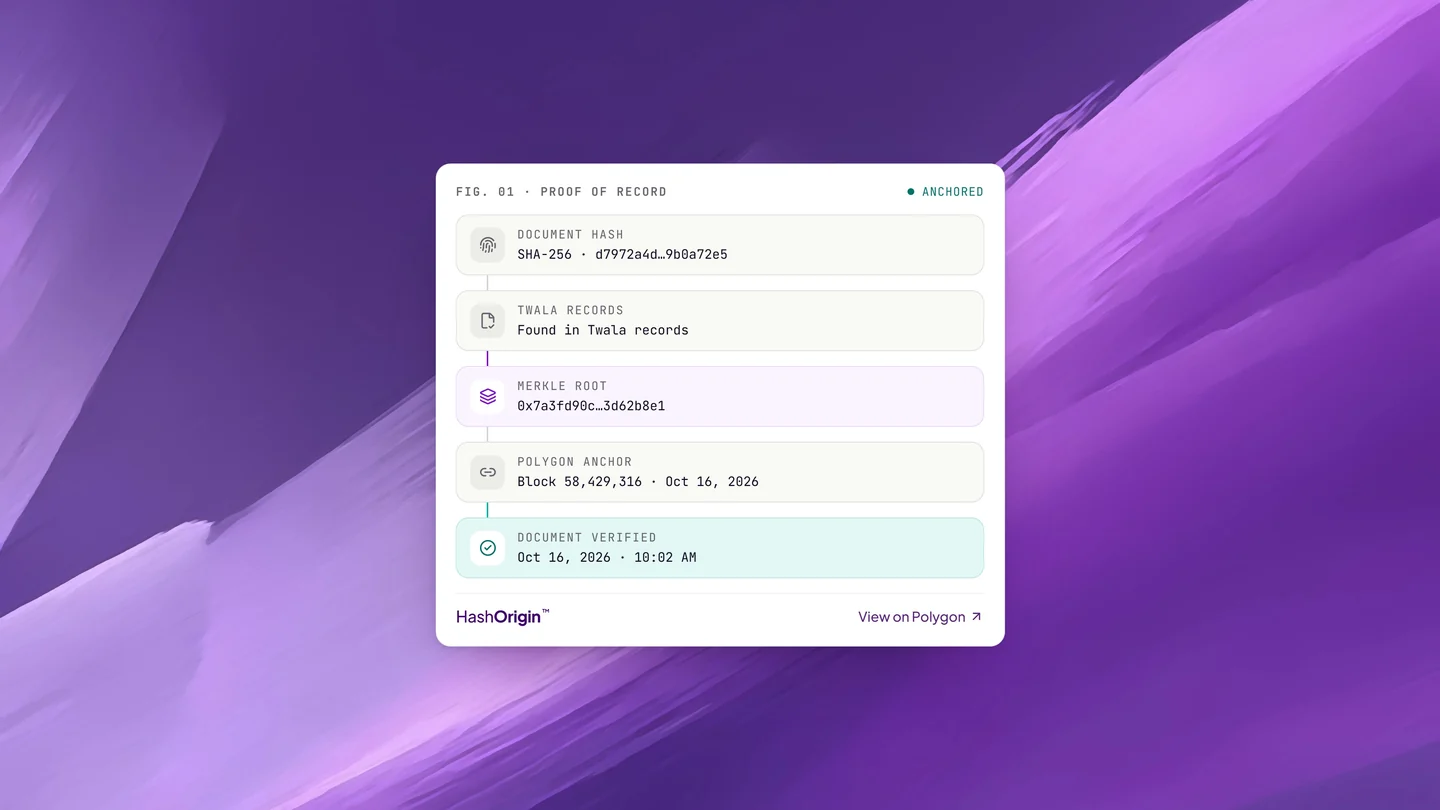
- Check it on Twala’s verify page. Open platform.twala.ai/verify and check the file. The page shows the document’s proof of record, from its fingerprint to its anchor on the Polygon blockchain. If anything in the file changed after it was sealed, the result reads Document tampered.
- Look at the signature panel. A PDF reader that checks digital signatures, such as Adobe Acrobat, can show whether the file has changed since Twala sealed it. It may not recognize the signer unless it trusts Twala’s certificate, which is why the verify page is the check to rely on.
- Read the notarial certificate page. It carries the notary’s seal, the notarial act (an acknowledgment or a jurat, for example), and the entry in the notary’s notarial register: document, page, and book numbers, and the series year. Compare the names with the applicant’s ID, as you would with paper.
- Keep the PDF, not a printout. Notarized documents on Twala are saved as PDF/A-2b, the archival PDF standard, so the copy in your case file stays readable and checkable for years.
Behind every document, the act is entered in the notary’s electronic notarial book and uploaded automatically to the Supreme Court’s Central Notarial Database. Our guide on how to verify an eNotarized document goes through each check in more detail.
Red flags worth a second look
- A PDF with a pasted image of a seal or a signature and no digital signature at all
- A “notarized” document that exists only as a printout or a photo
- A file that fails verification, or a signature panel that reports changes after signing
- Names, dates, or ID details that don’t match the person in front of you
- A paper document “notarized” over an ordinary video call. The 2020 interim rules that allowed remote notarization of paper documents have been repealed, and a video call on its own is not eNotarization.
When something looks wrong, send it to the office’s legal unit rather than refusing eNotarized documents as a class. A tampered PDF is far easier to catch than a forged paper notarization. The Supreme Court itself has recognized how easily third parties can fake notarial seals and stamps on paper (see our note on that ruling).
Change the checklist, not just the counter
Verification is easy to teach. The lasting fix is in what an office publishes and how it files.
- Say it in writing. Wherever a requirement reads “notarized,” add that eNotarized PDFs are accepted: in the Citizen’s Charter, on the website, and on the forms themselves. Staff follow what is printed on the window.
- Retire “original copy” for electronic documents. For an eNotarized document, the original is the PDF.
- Open a channel for files. An official email address, an upload portal, or a counter where the applicant opens the file is enough to begin.
- Write a one-page procedure with the verification steps above and the name of the person who decides doubtful cases.
- Set records rules. Keep the PDF in the case file. Printing and rescanning destroys the signatures that make it trustworthy.
- Talk to the next office in line. If your office accepts an eNotarized deed and the next agency in the process demands paper, the citizen is back where they started. Administrator Sirios made the same point about the agencies whose systems have to work with the LRA’s.
Leadership sets the pace
In “The Last Mile of Digitalization,” Atty. Bagro writes that his years in government taught him that digitalization comes down to socialization and leadership: people have to learn that the law already permits more than they think, and someone at the top has to decide that the office will work digitally. He said it more briefly at the October 19 launch of electronic notarization: “Change happens fast when leaders go all in.”
Government has already shown up for this reform. The launch was held in partnership with the Supreme Court, the Senate, the Department of Science and Technology, the Anti-Red Tape Authority (ARTA), and the Land Registration Authority, among others, and the first eNotarized documents were witnessed by the Secretary of Information and Communications Technology and ARTA’s Director General. “Let’s build a modern digital first economy where trust is encrypted, processes are seamless, and every Filipino feels that the government is their partner in success,” ARTA Director General Secretary Ernesto V. Perez said that day.
Twala has worked with government on digitalization for years, including the Department of Science and Technology, which backs Twala through a DOST-PCIEERD startup grant and an R&D partnership with DOST-ASTI, as well as the Department of Information and Communications Technology, the Senate, ARTA, and the Philippine Economic Zone Authority. In 2024, ARTA named Twala an Ease of Doing Business Champion, the only non-government awardee among 21.
Offices sign and notarize too
Accepting eNotarized documents is half the work. Offices also produce documents that need signatures and sometimes notarization: memorandums of agreement with local governments, supplier contracts, authorizations, and affidavits. On Twala, an office can draft them, route them for signature in a set order, have them notarized by an ENP, and keep them in team workspaces with roles and access controls. Enterprise plans add single sign-on, SIEM integration, advanced logging, and a guaranteed SLA. Read how Twala secures documents, or talk to us about a walkthrough for your office.
The legal framework is finished. What remains is the checklist on the window. For how electronic notarization works from the citizen’s side, see our complete guide to eNotarization in the Philippines, and for what changed on October 19, read what the launch means for you.
Twala is a Supreme Court-accredited Electronic Notarization Facility (ENF). Twala is a technology provider and does not give legal advice. Notarial acts are performed by commissioned Electronic Notaries Public.