HashOrigin Explained: How Blockchain Makes Documents Tamper-Evident

HashOrigin™ is the technology under every document Twala seals. It signs the finished PDF, records its fingerprint, and anchors that fingerprint on the Polygon blockchain, so anyone holding a copy can prove it hasn’t changed.
That sentence carries a lot of jargon, so this post takes it apart one piece at a time, without assuming you know what a hash or a Merkle tree is. If you do, the HashOrigin technology page has the specifications.
The problem it solves
A paper document is hard to copy perfectly, but easy to alter in small ways that may or may not get noticed: a figure changed with correction tape, a page swapped before the staples went in. A PDF has the opposite problem. Perfect copies cost nothing, and an edit leaves no trace on the page.
So for a digital document, the question that matters is never whether it looks right. It is whether this is exactly the file that was signed or notarized, down to the last byte. HashOrigin answers that question in two independent ways: a digital seal inside the file, and a fingerprint anchored on a public blockchain outside it.
Step 1: Seal the finished file
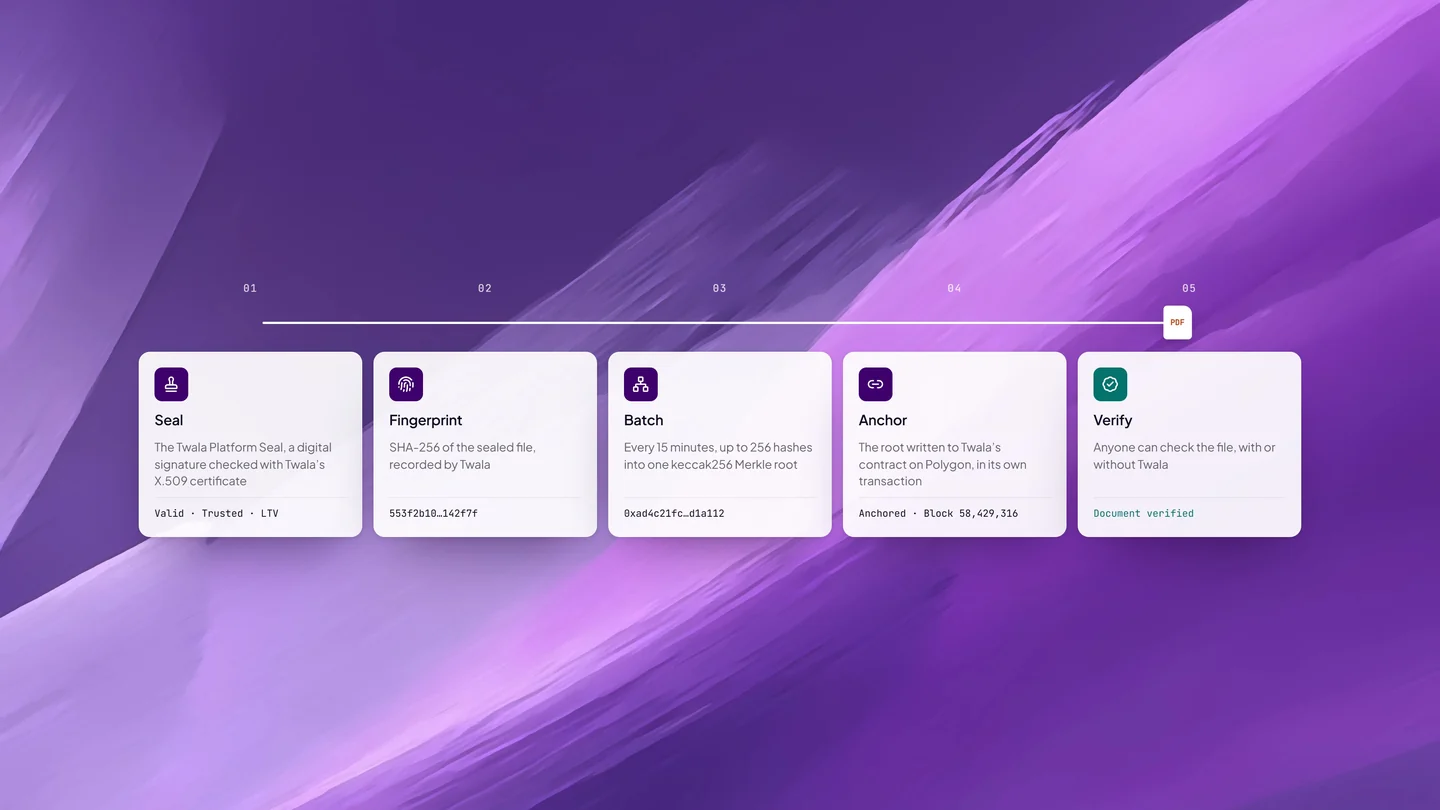
When a document is completed on Twala, whether it was signed, timestamped, or notarized, it is first converted to PDF/A-2b, the archival PDF standard (ISO 19005-2), so it stays readable for the long term. Then Twala seals it with the Twala Platform Seal: a digital signature made with Twala’s X.509 certificate, issued by Twala’s private certificate authority, over the entire finished file.
Each signature carries a trusted timestamp from a timestamp authority under RFC 3161, which fixes when it was made. When every signature on the document has it, long-term validation evidence is embedded too, so the signatures can still be checked after their certificates expire.
This is the first layer. Change anything in the file after sealing and the signature no longer matches it.
Step 2: Take its fingerprint
Next, Twala computes the sealed file’s SHA-256 hash and records it. A hash is a fingerprint: a 64-character code calculated from every byte of the file. The same file always produces the same fingerprint. Change a single comma and the fingerprint comes out completely different.
The calculation only runs one way. You can get the fingerprint from the document, but not the document from the fingerprint, so the fingerprint reveals nothing about what the document says. That matters for the next steps, because only fingerprints, never documents, go into what gets anchored.
Step 3: Batch the fingerprints
Every 15 minutes, Twala gathers up to 256 fingerprints and combines them into a Merkle tree. The fingerprints are paired and hashed together with keccak256, then the results are paired and hashed again, level by level, until a single value is left: the Merkle root.
That one root stands for every document in the batch. Each document can still be proven on its own, with a short trail of neighboring values called its anchor proof. Follow the trail up from a document’s fingerprint and you arrive at the root. Alter the document and the trail leads somewhere else.
Step 4: Anchor the root on Polygon
The Merkle root is written to Twala’s contract on the Polygon blockchain, in its own transaction. Once it is there, it can’t be altered, and every new block added to the chain buries the transaction deeper. If an anchoring job fails, it is retried automatically.
Nothing about the documents themselves goes on the chain. No names, no contents, no personal data: only the root, which is a fingerprint of fingerprints. That is how a public blockchain can hold the proof for contracts, affidavits, and powers of attorney without exposing any of them.
Step 5: Verify, with or without Twala
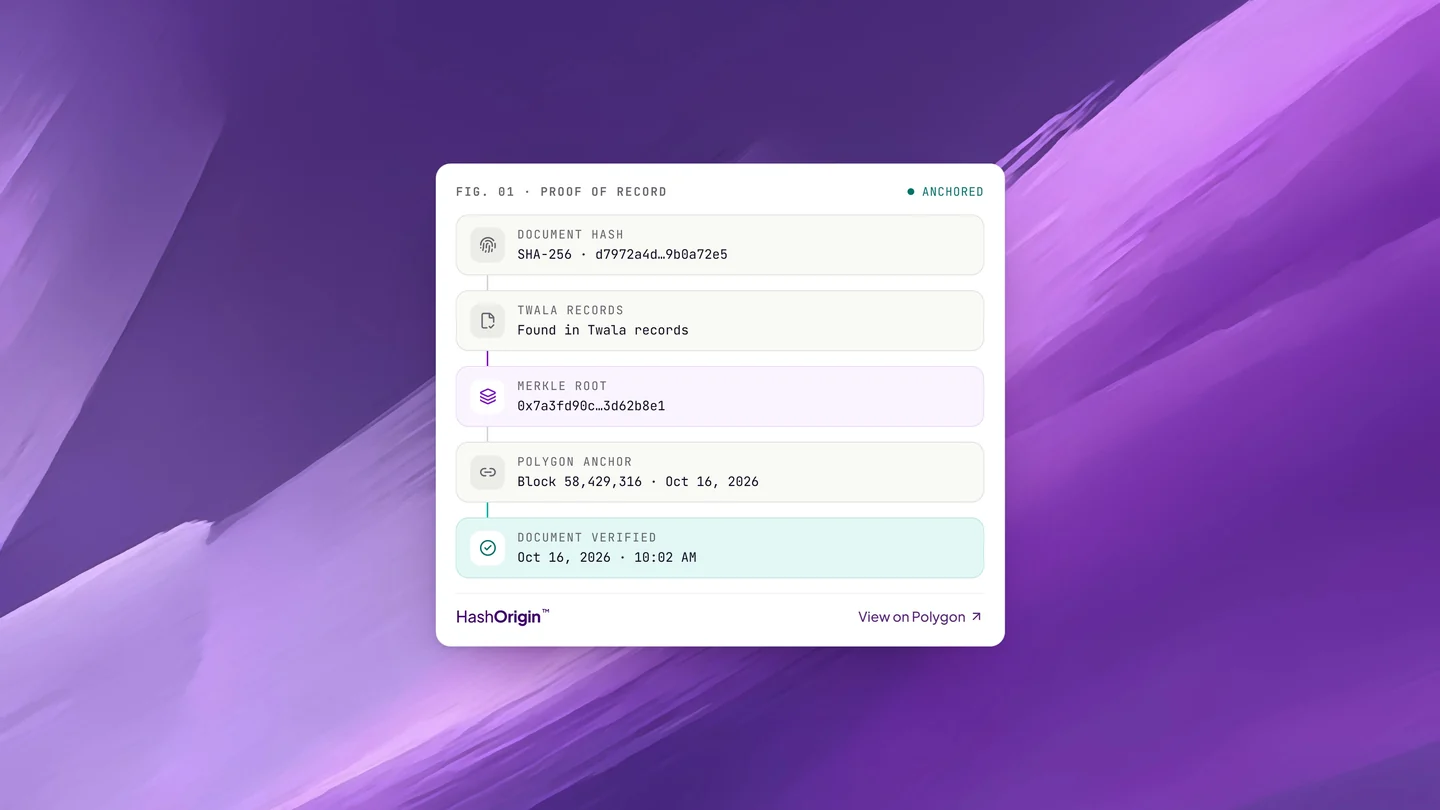
Anyone holding a copy can check it on Twala’s verify page. It computes the file’s fingerprint, looks for it in Twala’s records, and shows the Merkle root and the Polygon block where the root was anchored, with a link to view it on Polygon. Then it gives a verdict: Document verified, or Document tampered.
A tampered document fails twice over. The digital signatures inside the PDF no longer match the file, and the edited file’s fingerprint, followed up its anchor proof, produces a root that Twala’s contract on Polygon doesn’t hold.
The second check doesn’t need Twala at all. With the document’s anchor proof, anyone can recompute the root with their own tools and compare it with what is recorded on the chain. Anchor proofs, the contracts Twala anchors on, and a sample verifier are published at hashorigin.io, for anyone who would rather check than trust. Recipients who simply want to know what to look for can follow our guide on how to verify an eNotarized document.
Each layer, and what it proves
| Layer | What it proves | How to check it |
|---|---|---|
| Twala Platform Seal (X.509 digital signature) | The file hasn’t changed since it was sealed | Twala’s verify page, or the signature panel of a PDF reader such as Adobe Acrobat |
| RFC 3161 timestamp | When the seal was applied | The signature details in a PDF reader |
| SHA-256 fingerprint and Polygon anchor | This exact file existed, unchanged, when its batch was anchored | Twala’s verify page, or your own tools with the anchor proof |
One note on PDF readers: because the seal comes from Twala’s own certificate authority, a reader can always tell you whether the file changed, but it may not recognize Twala as the signer unless it trusts that certificate. The verify page checks the certificate against Twala’s trust registry, so it remains the reliable check.
What blockchain doesn’t do
Blockchain gets oversold, so it is worth being precise about its limits.
- It doesn’t store your document. Your files stay in your Twala workspace. The chain holds only roots.
- It doesn’t make a document legally valid. Validity comes from the law: the Electronic Commerce Act (R.A. 8792), the Rules on Electronic Evidence (A.M. No. 01-7-01-SC), and, for notarized documents, the Rules on Electronic Notarization (A.M. No. 24-10-14-SC). HashOrigin makes the evidence easy to check.
- It doesn’t replace the notary. The Electronic Notary Public confirms who appeared and that they acted freely. HashOrigin proves that the record of that act hasn’t changed since.
- It doesn’t stop copying. Anyone can copy a PDF. HashOrigin tells you whether the copy in front of you is the genuine, unchanged one.
Where you’ll see it
HashOrigin runs under every document Twala seals: envelopes signed with eSignatures, timestamped files, and every eNotarized document, which carries a “Secured by HashOrigin” mark on its notarization. You may have seen it under its earlier name, HashProof.
Twala has built blockchain-backed digital signatures since it was founded in 2020, and it keeps a research and development partnership with DOST’s Advanced Science and Technology Institute. Because HashOrigin is built on open standards (X.509 certificates, RFC 3161 timestamps, long-term validation, and PDF/A-2b), its documents also work with standard tools, such as PDF readers that check digital signatures and public blockchain explorers.
For the wider security picture, read how every eNotarized document is protected on Twala. For how a document gets notarized in the first place, start with our complete guide to eNotarization in the Philippines.