Inside Twala’s Security: How Every eNotarized Document Is Protected
Electronic notarization on Twala is protected in layers, from checking everyone who appears to sealing and anchoring the finished PDF. Here is each layer, for the reviewers who have to approve it.
Every Electronic Notarization Facility (ENF) the Supreme Court accredits has to clear the same technical bar. Rule VII of the Rules on Electronic Notarization (A.M. No. 24-10-14-SC) sets it out: e-KYC consistent with Bangko Sentral rules, multi-factor authentication, liveness detection, geolocation that detects VPNs, tamper-evident security, a way to verify eNotarized documents, real-time backup of notarial books, registration with the National Privacy Commission, a link to the Supreme Court’s database, and 99.9% uptime.
Treat that list as the floor. When a bank, a law firm, or a government office evaluates a facility, the useful questions are about what sits above it: how identity is really checked, how a document proves itself ten years from now, who can open what, and what happens when something fails. This is how Twala answers each one.
Who appears
Everyone who appears in a notarization, principal or witness, verifies their identity before the act can happen. With a Philippine National ID, they scan the QR code on the card and Twala checks it against the national registry. Otherwise they photograph a government-issued ID that hasn’t expired. Either way, a live face scan is matched to the ID photo. The checks are aligned with the BSP’s e-KYC and authentication guidelines and with NIST SP 800-63-3, and a verification stays current until the ID expires or for three years.
Accounts are protected at sign-in, too. People sign in with Google, Microsoft, a one-time email code, or their organization’s single sign-on, with two-factor authentication available. One account allows one sign-in at a time, so a new sign-in ends the earlier session. Behind that, sessions use an opaque httpOnly cookie with SameSite protection and short-lived access tokens refreshed on the server.
The notaries are checked as well. An Electronic Notary Public (ENP) applies on Twala with their certificate of notarial commission and IBP ID, and Twala reviews the application before they can take a single appointment. An ENP who fails to renew a commission is removed from the Supreme Court’s Directory of ENPs, which blocks access to every accredited facility.
More detail in how identity verification works in online notarization.
Where they are
The Rules require the notary to confirm, through geolocation, that everyone is in the Philippines. Twala checks each person’s connection when they book and again when they join a session, and it blocks VPNs, proxies, and Tor, so a location can’t simply be borrowed.
What happens in the session
Remote sessions run as live audio and video inside Twala, in the browser, not on an outside video app. A session is recorded, with a transcript, only if the notary asks and only once everyone in it consents, and only the notary can open the recording. Every notarization keeps an activity log, and each appointment’s Messages tab is limited to the people on that appointment.
How the document is sealed
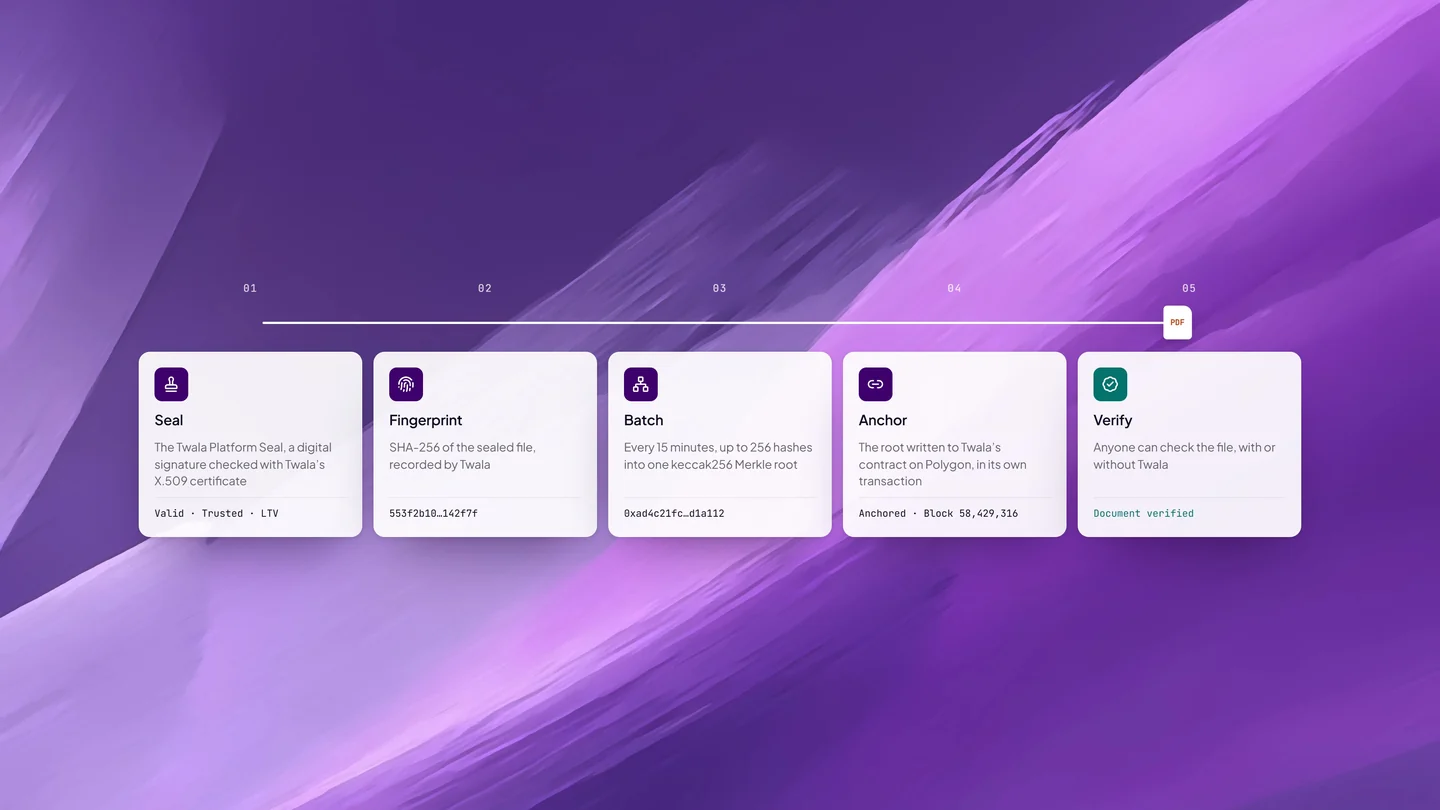
When an act is completed, the document is converted to PDF/A-2b, the archival PDF standard, and sealed with the Twala Platform Seal: a digital signature made with Twala’s X.509 certificate over the finished file. Each signature carries a trusted timestamp under RFC 3161, and long-term validation evidence is embedded when every signature has it, so the signatures stay checkable after their certificates expire.
Because the seal is a standard digital signature, a PDF reader such as Adobe Acrobat can confirm that the file hasn’t changed since it was sealed. Whether the reader also recognizes Twala as the signer depends on which certificate authorities it trusts; Twala’s verify page checks the certificate against Twala’s own trust registry, and it is the reliable check. Organizations can go a step further: Business plans add a business verified digital seal, and Enterprise adds a PKI digital seal.
How the document proves itself later
A seal protects a file as long as people trust the seal. HashOrigin™, the technology under every Twala document, adds a proof that doesn’t depend on trusting anyone. Twala records the sealed file’s SHA-256 fingerprint. Every 15 minutes, up to 256 fingerprints are combined into one keccak256 Merkle root, and that root is written to Twala’s contract on the Polygon blockchain in its own transaction. If an anchoring job fails, it is retried automatically.
From then on, anyone holding the document can check it on Twala’s verify page, or with their own tools using the document’s anchor proof. Change anything in the file and it reads Document tampered. For an auditor or a records office, that means the proof doesn’t rest on one company’s database. Our plain-language explainer on HashOrigin walks through the mechanics, and how to verify an eNotarized document covers the checks a recipient should run.
Where the record goes
Each act is entered in the ENP’s Electronic Notarial Book on Twala, and each month of entries becomes a notarial book. The notarized document is uploaded automatically to the Supreme Court’s Central Notarial Database as soon as it is sealed, so the record exists outside the notary’s own account from the first minute.
Who can see what
Access follows the role a person plays. The notary and the principals can open the notarized document. Witnesses see its status and register details, never the document itself, and can only get a copy by asking for one with a stated purpose, which the notary approves or denies.
Inside a company, team workspaces stay private until they are shared. Owners, admins, and members each have their own permissions, checked on every request, and owners and admins decide which members may use notary and AI features at all.
That includes Lex, the AI inside Twala. Lex runs privately, under Twala’s own cloud account. No user data is ever used to train the AI. AI search is switched on per file, and Lex answers only from files the person asking is allowed to open.
How the platform holds up
Every connection uses HTTPS, and the services behind it talk over TLS. Sensitive fields, such as bank details, are encrypted by the application before they are stored, with keys kept separate from session secrets. Each route has its own rate limit, every request carries a request ID for traceability, and the audit log is protected with HMAC-SHA256 integrity checks, so an edited entry would give itself away.
For resilience, the database keeps a standby in sync, ready to take over, and background work such as anchoring is retried automatically when it fails. A formal Disaster Recovery Plan and Business Continuity Plan sit behind that, along with continuous security monitoring and documented incident response procedures.
Enterprise customers can add single sign-on through SAML or OpenID Connect, advanced logging, SIEM integration, advanced reporting, and a guaranteed SLA. See pricing for what each plan includes.
Governance and standards
Twala handles personal data under the Data Privacy Act of 2012 (R.A. 10173), with a formal Privacy Manual and a designated Data Protection Officer, and nothing is collected for identity verification until the person consents. Twala is a member of the Cloud Signature Consortium, a global standards organization for cloud-based digital signatures, and its only member from the Philippines. On certification, Twala is working toward ISO/IEC 27001, with an internal information security management system already in place.
The floor, and what Twala builds on it
| Every accredited ENF must have | What Twala publishes above it |
|---|---|
| e-KYC consistent with BSP rules | The National ID checked against the national registry, or a government ID, matched to a live face scan and reusable for up to three years |
| Multi-factor authentication | Two-factor authentication, single sign-on through SAML and OpenID Connect, and one sign-in at a time |
| Geolocation that detects VPNs | Location checked at booking and again at joining, with VPNs, proxies, and Tor blocked |
| Tamper-evident security | A PKI seal with RFC 3161 timestamps and long-term validation, on PDF/A-2b files |
| A way to verify documents | The verify page, plus anchoring on Polygon that anyone can check without Twala |
| A link to the Supreme Court’s database | Automatic upload to the Central Notarial Database as each act is sealed |
| Real-time backup of notarial books | A database standby kept in sync, automatic retries, and Disaster Recovery and Business Continuity Plans |
| Registration with the National Privacy Commission | A Privacy Manual, a designated Data Protection Officer, and private AI that never trains on user data |
None of this replaces your own review. If you are running a vendor or security assessment for a bank, a law firm, or a government office, the security page and the trust center go further, and our team can walk your reviewers through the details: contact us. Teams weighing the switch can also read eNotarization for banks, lending companies, and cooperatives or our complete guide to eNotarization in the Philippines.
Twala is a Supreme Court-accredited Electronic Notarization Facility (ENF). Twala is a technology provider and does not give legal advice. Notarial acts are performed by commissioned Electronic Notaries Public.